How to Verify Open House Visitor Contact Information
Table of Contents
- Why Verifying Visitor Contact Information Matters
- Digital Open House Check-In Tools vs. Paper Sign-In Sheets
- Real Estate Lead Verification Strategies That Work
- Open House Sign-In Sheet Best Practices
- How to Follow Up With Open House Leads
- Handling Visitors Who Resist Sharing Information
- Privacy and Compliance Considerations
- Frequently Asked Questions
Last Updated: September 3, 2026
Why Verifying Visitor Contact Information Matters
A visitor scribbles an illegible name on a paper sign-in sheet and leaves. The agent follows up three days later, the phone number is fake, the email bounces, and the lead disappears. This happens thousands of times every weekend.
Verifying open house visitor contact information is the difference between a qualified lead and wasted follow-up time. When you capture real phone numbers and valid emails at the door, you reach interested buyers immediately and eliminate administrative work chasing bad data.
Agents struggle most with three problems: fake names and numbers submitted deliberately, typos that make contact impossible, and the inability to verify information in real time. This guide walks through how to verify open house visitor contact information from arrival to first follow-up.
Digital Open House Check-In Tools vs. Paper Sign-In Sheets
Paper sign-in sheets fail at their core job: capturing accurate, usable lead data. Visitors write illegibly, provide fake information intentionally, and agents can't verify anything in the moment. Data entry happens hours or days later, if at all, and typos multiply.
Digital check-in tools solve these problems by shifting verification to the point of entry. A visitor fills out a form on their own phone, delivering legible data immediately. The form validates email format and phone number structure in real time.
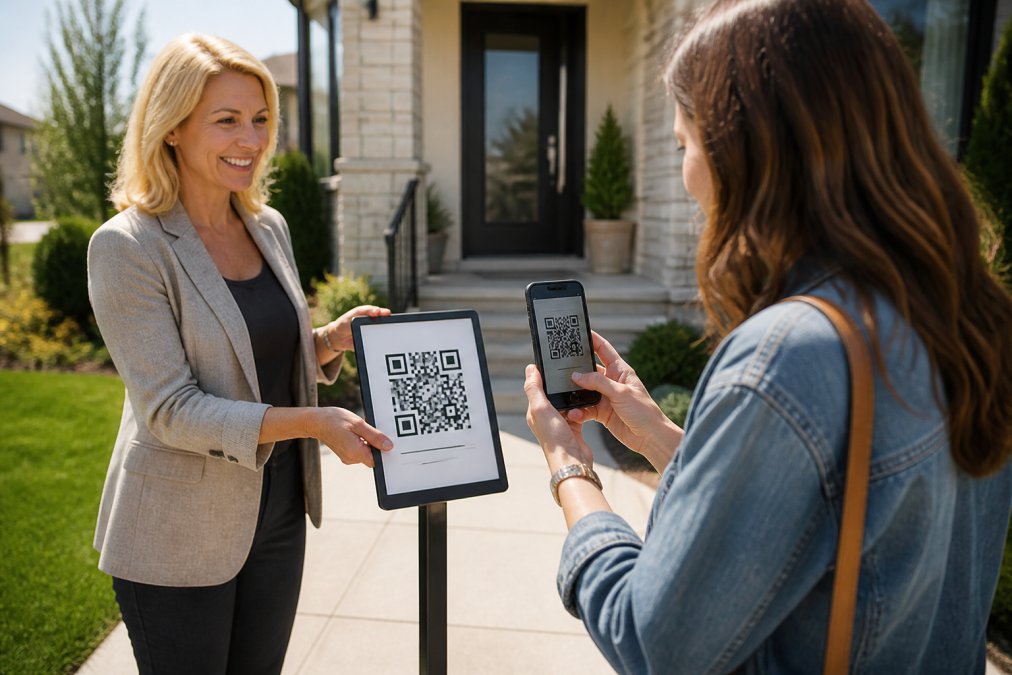
The verification mechanism matters. The best approach sends codewords (one by text, one by email) immediately after the visitor submits their form. They tell a codeword to the host agent at the door, no app, no typing, no confusion. The agent gets an instant alert with the visitor's details, proving the phone number and email are real without creating barriers to entry.
Digital tools also provide data unavailable from paper: which visitors plan to buy in the next three to six months (critical for prioritizing follow-up), custom questions specific to the property, timestamped records, and flags for VoIP numbers or bounced emails before you waste time calling them.
When the process is frictionless, no app download, no account creation, no waiting, adoption rates are high. Visitors appreciate not writing personal information on a shared sheet dozens of strangers will see.
Real Estate Lead Verification Strategies That Work
Verification happens at multiple stages: at the door when the visitor provides information, immediately after when you confirm the data is valid, and during follow-up when you test whether contact information actually works.
Phone and Email Validation at the Door
Phone number validation starts with format checking. A tool should reject entries that don't match a valid phone number pattern, have fewer than ten digits, contain obviously fake sequences, or show clear typing errors. This happens instantly while the visitor fills out the form.
Email validation checks that entries follow basic structure (something@domain.com) and catches common typos: .co instead of .com, missing domains, or obviously fake addresses.
Format validation only catches obvious errors. Real verification requires a second step: confirmation. The visitor submits their form, and the system sends a confirmation message to the phone number and email they provided. If the message bounces or fails to deliver, you know immediately the information is bad.
The best approach sends codewords to both channels and asks the visitor to show or speak one to the agent. The visitor receives the codeword on their own phone, proving they own that number. They receive a second codeword via email, proving they own that address. Showing both codewords to the agent confirms they're the person who submitted the form. If one codeword delivery is slow, the visitor has a backup.
Flagging Suspicious or Invalid Data
Not all bad data is accidental. Some visitors intentionally provide fake information to avoid follow-up calls. Identifying these patterns helps you prioritize real leads.
A good verification system flags several red flags automatically:
VoIP numbers and burner phones often mask the caller's real identity. Not inherently suspicious, many legitimate buyers use them for privacy, but worth noting as lower-priority leads.
Bounced emails indicate the address doesn't exist or is no longer active. If the confirmation email fails to deliver, follow-up via email won't work.
Undeliverable text messages suggest the phone number is inactive, disconnected, or registered to a different carrier. A signal that this lead may be lower quality.
STOP opt-outs are visitors who have previously asked not to be contacted. Honoring these requests is both ethical and legally required. A verification system should flag these automatically.
Flagging doesn't mean discarding, it means prioritizing. Leads with verified phone numbers and valid emails that have successfully received confirmation codewords should be contacted first. Flagged leads can be followed up on later or contacted via alternative methods.
Open House Sign-In Sheet Best Practices
Even with a digital check-in system, underlying principles of a good sign-in sheet apply. The form should ask for information you actually need, in logical order.
Start with basics: name, email, phone number. These three fields are non-negotiable. Keep the form short; longer forms increase abandonment and fake information.
Add one strategic question beyond the basics. For most agents, this is buying timeline: "When are you planning to buy?" Answers like "0-3 months," "3-6 months," "6-12 months," and "12+ months" help you segment leads immediately. A visitor planning to buy in three months is a hot lead; someone looking 12+ months out is warm but not urgent.
You can replace the buying timeline question with something property-specific: "What's your biggest priority in a home?" or "Are you interested in properties in this neighborhood?" Customize the question to your market and listings.
After Tour feedback is a second opportunity to gather information. Once the visitor has seen the property, ask them to rate it (1-10 scale) and share their price verdict: "Too High," "Reasonable," or "Too Low." This feedback is valuable for your seller and helps you understand which visitors were genuinely interested.
The form should be available in 16 languages. Many open house visitors are non-native English speakers. Offering the form in multiple languages removes barriers to entry and shows respect for your market.
Make the form mobile-friendly and fast. Visitors fill it out on their phones, often while standing outside in sun or cold. The form should load quickly, be easy to read on a small screen, and take less than 30 seconds to complete.
How to Follow Up With Open House Leads
The speed of follow-up matters more than most agents realize. A visitor who provides contact information on Saturday morning is most engaged Saturday afternoon. By Monday, their interest has cooled. By Wednesday, they've forgotten about the property.
Ideally, follow up within the same day. At minimum, follow up within 24 hours. This requires a system that alerts you immediately and helps you prioritize, you can't manually call 20 visitors the same day.
Sending Instant Alerts and Automated Reports
The moment a visitor submits their information and receives their codeword, you should be notified. A text message alert is ideal because you'll see it immediately, even if you're busy showing other properties. An email alert provides a backup and creates a record.
The alert should include the visitor's name, phone number, email, buying timeline, and any custom questions they answered. You can see at a glance whether this is a hot lead (buying in 0-3 months) or a longer-term prospect.
After the open house ends, you should receive an automated report summarizing the day's activity: how many visitors came, how many provided valid contact information, and the breakdown of buying timelines. This helps you understand the open house's effectiveness and plan your follow-up strategy.
Some agents share this data with the homeowner. A seller report showing that qualified visitors came to the open house, with a percentage planning to buy within six months, demonstrates real interest and activity. This builds confidence in your marketing efforts.
Integrating Verified Data Into Your CRM
Verified lead data is only valuable if it gets into your CRM where you can actually use it. Manual data entry is slow, error-prone, and easy to forget. Automation is essential.
The best systems deliver leads to your CRM automatically through a formatted lead email sent to your CRM's intake address, which the CRM parses and populates automatically. Alternatively, a webhook integration (using Zapier or similar) sends the lead data directly into your CRM in real time.
Once the lead is in your CRM, you can trigger automated follow-up sequences. A text message can go out immediately thanking the visitor for coming. An email can follow 24 hours later with more information about the property or other listings they might be interested in.
The CRM should segment leads by buying timeline automatically. Leads buying in 0-3 months get different follow-up than leads buying in 12+ months. Your nurture sequences should match the timeline.
You should also track which leads convert to showings, which convert to offers, and which never respond. Over time, this data shows you which open houses generate the highest-quality leads, which neighborhoods your buyers are interested in, and which follow-up strategies work best.
Handling Visitors Who Resist Sharing Information
Not every visitor will happily scan a QR code and fill out a form. Some are uncomfortable with technology. Others are skeptical about sharing information.
For visitors uncomfortable with technology, offer a simple alternative: open the same form on your phone and fill it out together. This removes the barrier of using their own device and gives you a chance to build rapport and answer questions about the property.
For visitors skeptical about privacy, be transparent. Explain that you're collecting their information to follow up about the property and won't share it without their permission. Mention they can opt out of future communications anytime. Many people are willing to share information when they understand exactly how it will be used.
For visitors who refuse to provide information at all, you have a choice: let them tour anyway or ask for at least a name and phone number. The right approach depends on your market, brokerage, and comfort level.
When you make the check-in process easy and fast, visitors are more likely to comply. The simplest, fastest verification process will get the highest participation rates.
Privacy and Compliance Considerations
Collecting phone numbers and email addresses at open houses creates privacy obligations. You need to be transparent about what you're doing with the data, how long you're keeping it, and who has access to it.
Your verification form should include a brief privacy notice: "We collect your contact information to follow up about this property and other listings you may be interested in. We won't share your information with third parties without your consent. You can opt out of communications anytime by replying STOP to any text or email."
Keep the notice short and in plain language. Visitors should understand it in 10 seconds.
Respect opt-outs globally. If someone replies STOP to a text message, don't text them again, ever. If someone unsubscribes from your email list, honor that request. A good verification system flags STOP opt-outs automatically so you don't accidentally contact someone who has asked not to be contacted.
Data retention is another consideration. How long do you need to keep visitor information? Most agents keep it for at least a year, in case the visitor decides to buy later. After that, delete it.
If you're collecting information from international visitors, be aware of additional privacy requirements. Some countries have stricter data protection laws than others. WhatsApp is available in most countries, so international visitors can receive verification codewords via WhatsApp if their phone number is outside the US or Canada.
Be cautious about sharing visitor data with third parties. Some lenders or title companies want to co-brand your open house and get access to visitor lists. This is legal, but visitors should know about it. A disclosure like "By providing your information, you consent to [Lender Name] contacting you about financing options" should be included on the form.
Verifying open house visitor contact information transforms your lead pipeline from questionable names and fake phone numbers into a database of real, reachable prospects. The process starts at the door with a fast, simple check-in: a QR code scan and a brief form filled out on the visitor's own phone. It continues with instant verification that proves the phone number and email are real. It culminates in automated follow-up that reaches hot leads while they're still interested.
The best verification systems make this process effortless for visitors and agents alike. ohACCESS replaces paper sign-in sheets with verified digital check-in that delivers leads into your CRM automatically. Visitors scan a QR code, fill out a short form, and receive two codewords, one by text, one by email. They tell a codeword to you at the door, proving their contact information is real. You get an instant alert with their details and a one-tap seller report to share with your homeowner. Start your free trial today and see how verified leads change your open house results.
Frequently Asked Questions
Q: Why is it important to verify visitor contact information at an open house?
A: Unverified contact information leads to wasted follow-up time, bounced emails, and invalid phone numbers that prevent you from reaching qualified buyers. Verification ensures every lead in your database is real and actionable. When you confirm phone and email at the door, you know the visitor actually owns those accounts and can receive your messages. This separates hot leads from tire-kickers and protects your time and reputation.
Q: How can agents ensure the phone numbers and emails collected at open houses are accurate?
A: The most effective method is instant verification at the door. Visitors fill out a registration form on their own phone, and the system immediately sends confirmation codewords by text and email. When the visitor shares a codeword with you to enter, you've confirmed both channels are real and belong to them. This approach catches typos and fake information instantly, unlike paper sheets where errors aren't discovered until follow-up attempts fail days later.
Q: What are the benefits of using digital check-in tools over paper sign-in sheets?
A: Digital check-in eliminates handwriting errors, automatically captures data in a searchable format, and verifies contact information in real time. Paper sheets require manual data entry, create legibility issues, and offer no proof that information is accurate until you attempt follow-up. Digital tools also provide instant alerts when visitors arrive, generate automated reports for sellers, and integrate directly with your CRM without manual copying.
Q: How do you handle visitors who are hesitant to provide their contact information?
A: Explain that you need their information to send them property details, schedule follow-up showings, and keep them updated on price changes or new listings. Frame it as a benefit to them, not a requirement. For visitors uncomfortable with digital forms, reassure them that the process takes 30 seconds on their own phone, no app, no account, and their information is only shared with you as the agent. Most hesitation disappears once they understand the simplicity and privacy controls.
This article was written using GrandRanker
Frequently asked questions
Q: Why is it important to verify visitor contact information at an open house?
A: Unverified contact information leads to wasted follow-up time, bounced emails, and invalid phone numbers that prevent you from reaching qualified buyers. Verification ensures every lead in your database is real and actionable. When you confirm phone and email at the door, you know the visitor actually owns those accounts and can receive your messages. This separates hot leads from tire-kickers and protects your time and reputation.
Q: How can agents ensure the phone numbers and emails collected at open houses are accurate?
A: The most effective method is instant verification at the door. Visitors fill out a registration form on their own phone, and the system immediately sends confirmation codewords by text and email. When the visitor shares a codeword with you to enter, you've confirmed both channels are real and belong to them. This approach catches typos and fake information instantly, unlike paper sheets where errors aren't discovered until follow-up attempts fail days later.
Q: What are the benefits of using digital check-in tools over paper sign-in sheets?
A: Digital check-in eliminates handwriting errors, automatically captures data in a searchable format, and verifies contact information in real time. Paper sheets require manual data entry, create legibility issues, and offer no proof that information is accurate until you attempt follow-up. Digital tools also provide instant alerts when visitors arrive, generate automated reports for sellers, and integrate directly with your CRM without manual copying.
Q: How do you handle visitors who are hesitant to provide their contact information?
A: Explain that you need their information to send them property details, schedule follow-up showings, and keep them updated on price changes or new listings. Frame it as a benefit to them, not a requirement. For visitors uncomfortable with digital forms, reassure them that the process takes 30 seconds on their own phone—no app, no account, and their information is only shared with you as the agent. Most hesitation disappears once they understand the simplicity and privacy controls.
Keep reading
Start free with 25 verified check-ins. No credit card required.
Start Free