7 Steps to Build Emergency Communication Plans for Agents
Last Updated: November 10, 2026
Quick Summary
Emergency communication plans for real estate agents name who to call first, set how alerts are sent, and lay out each person's next steps. Build them before your next showing, because improvising under stress is when mistakes happen.
- Map risk points such as entry and exit, vacant rooms, visitor flow, and solo time.
- Verify every emergency contact number before you need it, and confirm your backup contact quarterly.
- Run a three-layer alert stack: text as primary, phone call as secondary, and email as a written record.
- Pin a missed check-in escalation sequence in your text thread so no one decides it under stress.
- Ask your backup contact to reply with one word, such as received, to confirm an alert landed.
Table of Contents
- Why Real Estate Agents Need an Emergency Communication Plan
- Step 1: Map the Risks You Face at Showings and Open Houses
- Step 2: Build a Verified Emergency Contact List
- Step 3: Set Up Real-Time Alert Channels That Work in the Field
- Step 4: Write Crisis Message Templates Before You Need Them
- Step 5: Apply Open House Security Best Practices
- Step 6: Handle Emergencies During Property Showings
- Booking Your Next Open House With Verified Check-In
- Frequently Asked Questions
Why Real Estate Agents Need an Emergency Communication Plan
Open houses put agents in unfamiliar homes with strangers, often alone. A solid emergency communication plan means you can reach help fast and keep your team informed when something goes wrong. Without one, agents improvise under stress, and that is when mistakes happen, so build your emergency communication plans before your next showing.
Emergency communication plans for real estate agents do three things. They name who you call first, they set how you send alerts, and they lay out what each person does next. Industry data shows that 71% of buyers prefer receiving information by text message, so text is often the fastest channel to start with. HousingWire 2026 real estate statistics on buyer communication preferences
Think of this plan as a checklist you can use under pressure. The steps below walk you through it, one piece at a time.
Step 1: Map the Risks You Face at Showings and Open Houses
Start by listing where you are most exposed. Walk through a typical open house in your head and mark each point where a problem could start.
Common risk points include:
- Entry and exit: The front door and the driveway
- Vacant rooms: Basements, attics, and rooms out of sight of the front door
- Visitor flow: Crowded hallways, stairs, and back doors
- Solo time: Moments when you are the only agent on site
For each risk, write one sentence describing what could happen and one sentence describing your first response. Keep the list short. A plan you can remember beats a long document you never open.
Step 2: Build a Verified Emergency Contact List
Your contact list should answer one question fast: who do I reach, and how? Keep it on your phone and on paper in your car.
Include these entries:
- Local emergency services: Use 911 and your local non-emergency line
- Your broker or team lead: The person who needs to know what happened
- A backup contact: Someone who knows your schedule and can check in
- The property owner or seller's agent: Confirm the number before the event
Verify every number before you need it. Learn how to verify visitor contact information Call the backup contact once a quarter to confirm they still answer. A number that rings unanswered during an emergency is worse than no number at all.
Step 3: Set Up Real-Time Alert Channels That Work in the Field
Most emergency plans written for corporate offices assume a stable connection and a desk. Solo showings do not work that way. Many vacant homes have weak cellular coverage in basements, interior rooms, and rural lots, and your alert system has to function under those conditions.
Start with two channels that fail in different ways. A text message is usually the first to get through because it needs very little bandwidth, and it can queue and deliver once you regain signal. A phone call is the second channel because it gives your backup contact a voice to hear your tone.
Build a simple stack you can run from your phone alone:
- Primary: A text thread with your backup contact, with a pinned message containing the property address, your scheduled end time, and the check-in deadline
- Secondary: A group text or group chat with your broker or team lead, so one message reaches everyone who needs to know
- Record: A shared note or email thread where you log timestamps of each check-in, which gives you a written trail afterward
Decide ahead of time what happens when a check-in is missed. For example, your backup contact should call your phone once, then call the property's listing office, then call 911 if there is still no answer. Write that sequence in the pinned message so nobody has to decide it under stress.
Watch out: A text that shows as sent but not delivered is not a confirmed alert. Ask your backup contact to reply with a single word, such as "received," so you know the message landed.
Before each open house, check three things: that your phone has a signal at the front door and at the farthest room you plan to show, that your battery is above half, and that your backup contact has the address and the check-in time. Carry a portable battery for events longer than four hours, and keep your phone on a charger between showings when you can.
The three layers of the alert stack, and what each one is for, are summarised below.
| Channel | Role | Why it matters |
|---|---|---|
| Text message | Primary | Needs little bandwidth and can deliver once signal returns |
| Phone call | Secondary | Gives your backup contact a voice and tone |
| Record | Creates a written timestamped trail afterward |
Step 4: Write Crisis Message Templates Before You Need Them
Writing messages during an emergency wastes time. Draft them now and save them in your phone.
Here are two templates you can copy and fill in:
Check-in alert: "Open house at [address] is active. I am on site until [time]. If I do not check in by [time], call [backup name] at [number]."
Incident alert: "Situation at [address]. I need [police / medical / help] now. I am at [location in the home]. Please call [number] and send help."
Keep each message short. Fill in the address, time, and names ahead of time, so you only swap in the details that change.
Step 5: Apply Open House Security Best Practices
Solo agents face a risk profile that corporate guides rarely address. You are often alone in a vacant home, you may not know the people walking in, and your visitor records contain personal details that could be misused if they leak. Security for an open house covers both the physical space and the data you collect about the people who visit it.
Physical security during the showing
Before you open the door, walk the home once and note every room that could trap you or hide someone. Learn how to protect agents at showings Basements, attics, and rooms with a single doorway deserve special attention.
When you lock rooms you do not show, use a method you can open quickly if you need to leave in a hurry. A lockbox code you have memorized is better than a key you must search for.
Keep your phone in a pocket or on a lanyard, not on a table in another room. If a visitor asks to be shown something outside your sight line, politely decline and go with them only as far as you can see.
Digital security for visitor data
This is the gap most emergency guides skip. Your sign-in records are sensitive. Learn how to manage visitor privacy during property tours They contain names, phone numbers, email addresses, and buying timelines. Treat them the same way you treat client files.
- Do not write visitor contact details on loose paper that stays in the home or your car
- Export records only to systems you control, and remove downloaded files once they are in your CRM
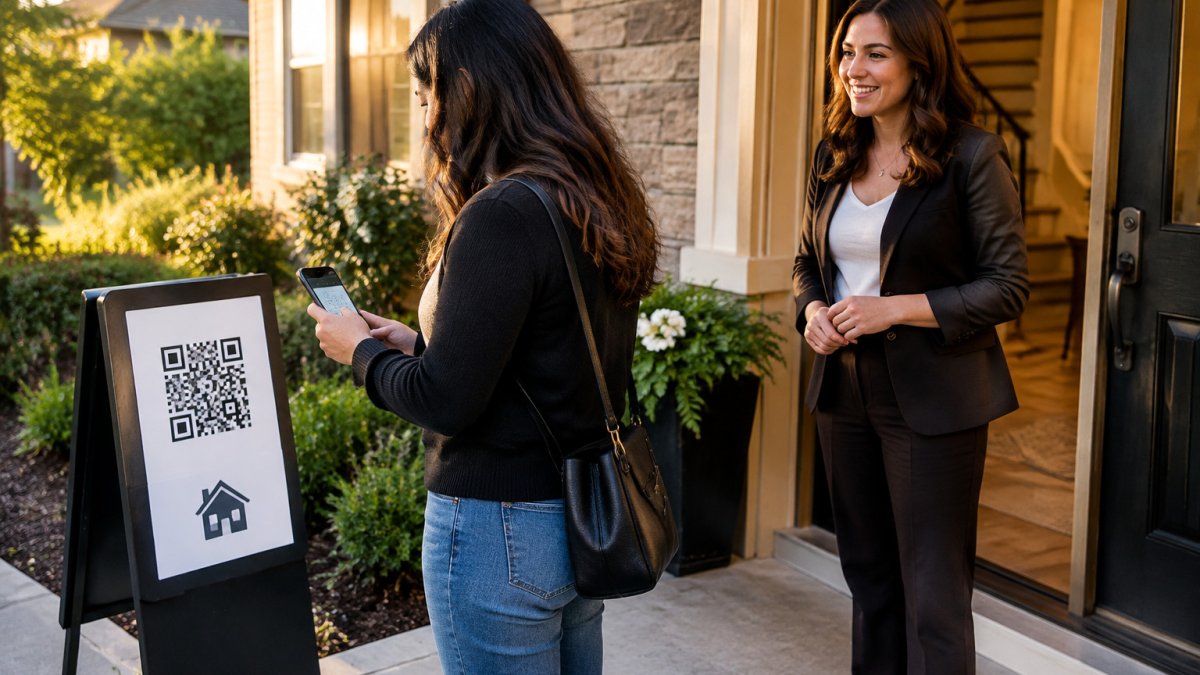
- Use a verified digital sign-in so each visitor enters their own details on their phone, which removes the paper sheet that anyone walking through could read. ohACCESS works this way: a visitor scans your QR code, fills out a short form on their own phone, and receives two codewords, one by text and one by email, then tells one codeword to you at the door. Every sign-in sends you an instant text and email alert.
- When sharing results with a seller, use an aggregate summary rather than a list of names. ohACCESS's Seller Report shows only counts, timeline breakdowns, and average ratings, with no visitor names, phone numbers, emails, or arrival times.
Retention matters too. Decide how long you keep visitor records and delete what you no longer need. Match or shorten that window to your own policy.
Signals to act on
Agree on a trouble signal with your backup contact in advance. A short phrase in a text, such as "Call me back in five," tells them to start the escalation sequence without alarming a visitor who may be nearby. Practice the signal once before your first solo event so you both know what it means.
Step 6: Handle Emergencies During Property Showings
When something goes wrong, follow your plan in order:
- Get to safety first. Leave the home if you feel threatened.
- Call 911. Describe the address and what is happening.
- Send your incident alert. Use the template from Step 4.
- Stay on the line with emergency services until they tell you to stop.
- Notify your broker after the situation is under control.
Afterward, write down what happened while the details are fresh. Note the time, the people involved, and what each person did. Share this record with your broker and, if needed, with the authorities.
If you want more guidance on personal safety tools, read our comparison of personal safety apps for real estate agents.
Booking Your Next Open House With Verified Check-In
Your emergency plan works best when you also know who is walking through the door. ohACCESS replaces the paper sign-in sheet with verified digital check-in. A visitor scans your QR code, fills out a short form on their phone, and receives two codewords, one by text and one by email. They tell a codeword to you at the door to enter. Every sign-in sends you an instant alert.
The free trial covers your first 25 sign-ins with every feature included and no credit card. After that, the Pro plan is $15 per month, billed monthly, with annual and two-year options available.
Ready to add verified check-in to your next open house? Start Free and set up your first event in minutes.
Frequently Asked Questions
What should be included in a real estate agent's emergency plan?
A workable plan names the risks you face (solo showings, open houses, unfamiliar visitors), lists emergency contacts with at least two channels each, and states who gets notified first and how. Include your brokerage contact, a trusted colleague who knows your schedule, local emergency number routing, and a rule for leaving a showing early. Write the message templates and store them where you can reach them on your phone. Review the plan every quarter and after any incident, so contact details and team roles stay current.
How do you communicate during an emergency at an open house?
Send alerts through the channels that reach people fastest: text message first, then email. Keep messages short, state what happened, where you are, and what you need the recipient to do. Use a pre-written template so you do not compose under stress. If you use ohACCESS, every sign-in triggers an instant text and email alert to you, and the verified visitor log shows who was in the home at that time, which helps you brief a colleague or emergency responders accurately.
Why is verified visitor check-in important for agent safety?
Paper sign-in sheets let visitors write any name and any phone number, so you cannot confirm who was in the home. Verified check-in requires each visitor to receive two codewords, one by text and one by email, and to speak one to the host at the door. This proves the phone number and email belong to the person present. A verified log gives you a reliable record of attendance if something goes wrong, and it reduces fake contact information in your lead data.
How can digital tools improve emergency response for real estate agents?
Digital tools shorten the time between an incident and a response. Instant text and email alerts reach you the moment a visitor signs in, and a centralized contact list lets you reach your team in one step. ohACCESS starts free with the first 25 sign-ins, and paid plans are $15 per month for a solo agent, $120 per month for a team of 2 to 10 agents, or $11 per agent per month for brokerages of 11 to 100 agents.

Frequently asked questions
What should be included in a real estate agent's emergency plan?
A workable plan names the risks you face (solo showings, open houses, unfamiliar visitors), lists emergency contacts with at least two channels each, and states who gets notified first and how. Include your brokerage contact, a trusted colleague who knows your schedule, local emergency number routing, and a rule for leaving a showing early. Write the message templates and store them where you can reach them on your phone. Review the plan every quarter and after any incident, so contact details and team roles stay current.
How do you communicate during an emergency at an open house?
Send alerts through the channels that reach people fastest: text message first, then email. Keep messages short, state what happened, where you are, and what you need the recipient to do. Use a pre-written template so you do not compose under stress. If you use ohACCESS, every sign-in triggers an instant text and email alert to you, and the verified visitor log shows who was in the home at that time, which helps you brief a colleague or emergency responders accurately.
Why is verified visitor check-in important for agent safety?
Paper sign-in sheets let visitors write any name and any phone number, so you cannot confirm who was in the home. Verified check-in requires each visitor to receive two codewords, one by text and one by email, and to speak one to the host at the door. This proves the phone number and email belong to the person present. A verified log gives you a reliable record of attendance if something goes wrong, and it reduces fake contact information in your lead data.
How can digital tools improve emergency response for real estate agents?
Digital tools shorten the time between an incident and a response. Instant text and email alerts reach you the moment a visitor signs in, and a centralized contact list lets you reach your team in one step. ohACCESS starts free with the first 25 sign-ins, and paid plans are $15 per month for a solo agent, $120 per month for a team of 2 to 10 agents, or $11 per agent per month for brokerages of 11 to 100 agents.
Keep reading
Start free with 25 verified check-ins. No credit card required.
Start Free