Zillow Showcase vs Other Virtual Tour Providers

Table of Contents
- Zillow Showcase vs Other Virtual Tour Providers: Quick Comparison
- What Makes Zillow Showcase Different
- Matterport and iGuide: Technical Depth vs Marketing Reach
- Open House Sign-In Sheet Alternatives That Complement Virtual Tours
- Digital Open House Check-In Best Practices for Lead Capture
- Cost-Benefit Analysis: Virtual Tour ROI and Lead Quality
- Mobile-First Experience and Accessibility Compliance
- Conclusion
- Frequently Asked Questions
Last Updated: September 14, 2026
Zillow Showcase vs Other Virtual Tour Providers: Quick Comparison
Choosing between Zillow Showcase and other virtual tour providers comes down to one question: reach or depth? This guide from ohACCESS breaks down how the major options differ on price, integration, and lead quality.
Zillow Showcase uses AI-generated 3D tours and interactive floor plans to boost visibility inside the Zillow ecosystem. Matterport and iGuide take the opposite approach, producing high-fidelity spatial data you can host and embed anywhere. The right pick depends on whether your buyer traffic lives on one portal or across many.
| Provider | Starting Price | Best For | Key Limitation |
|---|---|---|---|
| Zillow Showcase | Per-listing fee | Maximum Zillow visibility | Zillow-only benefits |
| Matterport | Free tier, then paid plans | Cross-platform 3D models | Steeper learning curve |
| iGuide | Per-project fee | Accurate floor plans | Specialized hardware |
| ohACCESS | Free trial (25 sign-ins) | Verified open house leads | No built-in drip campaigns or automated follow-up sequences |
Below, we'll show how each option performs on integration, mobile experience, and lead capture, plus the open house workflow that turns tour traffic into contactable buyers.
What Makes Zillow Showcase Different
Zillow Showcase generates AI-powered 3D tours and interactive floor plans automatically from submitted photos, then places the listing in an enhanced position within Zillow search results. The trade-off is scope: the benefits apply only where Zillow buyers are looking.
AI-Powered 3D Tours and Interactive Floor Plans
Agents submit photography, and Showcase assembles a navigable 3D walkthrough with an interactive floor plan, no specialized camera required. That's a genuine advantage over providers that demand dedicated hardware and a trained operator.
What most guides miss is the dependency it creates. Your tour only performs where Zillow syndicates it. According to NAR's profile of home buyers and sellers, buyers still rely heavily on multiple sources during their search, which means a single-platform asset leaves reach on the table.
Platform Integration and Listing Visibility
Integration here means one thing: preferential placement inside Zillow's search results, with an analytics dashboard tracking views, saves, and shares. For sellers who care about Zillow traffic specifically, that's the core selling point.
The catch is that this is a walled garden. There's no portable asset you can drop into your own website, your MLS, or a competitor's portal. If your marketing strategy depends on listing syndication across channels, you're paying for reach you can't reuse.
Matterport and iGuide: Technical Depth vs Marketing Reach
Matterport and iGuide sit on the opposite end of the spectrum. Both produce professional-grade 3D captures you own and can distribute wherever you like, and both sacrifice the frictionless, portal-native visibility Zillow bundles in.
Spatial Data and Measurement Accuracy
iGuide's strength is measurement: floor plans with square footage calculations and room-by-room dimensions, which matters when buyers want technical property data before they tour. Matterport counters with automated floor plan generation and measurement tools built on its 3D capture pipeline.
If accuracy is your priority, expect to invest in specialized hardware and time to learn the capture workflow, the honest cost of professional-grade spatial data.
Media Hosting and Cross-Platform Compatibility
Here's where the open ecosystem wins. Matterport integrates with third-party platforms including Zillow and Realtor.com, and both Matterport and iGuide produce embeddable media you can host on your own site or MLS, you control the asset, hosting, and cloud storage terms.
The trade-off is administration: someone has to manage assets across platforms, and subscription costs scale with volume, which adds up faster than a flat per-listing fee.
Open House Sign-In Sheet Alternatives That Complement Virtual Tours
The best open house sign-in sheet alternatives pair a virtual tour with verified digital check-in, so buyers who tour online and those who walk through the door both end up as contactable leads. A tour drives interest; check-in converts it into follow-up data.
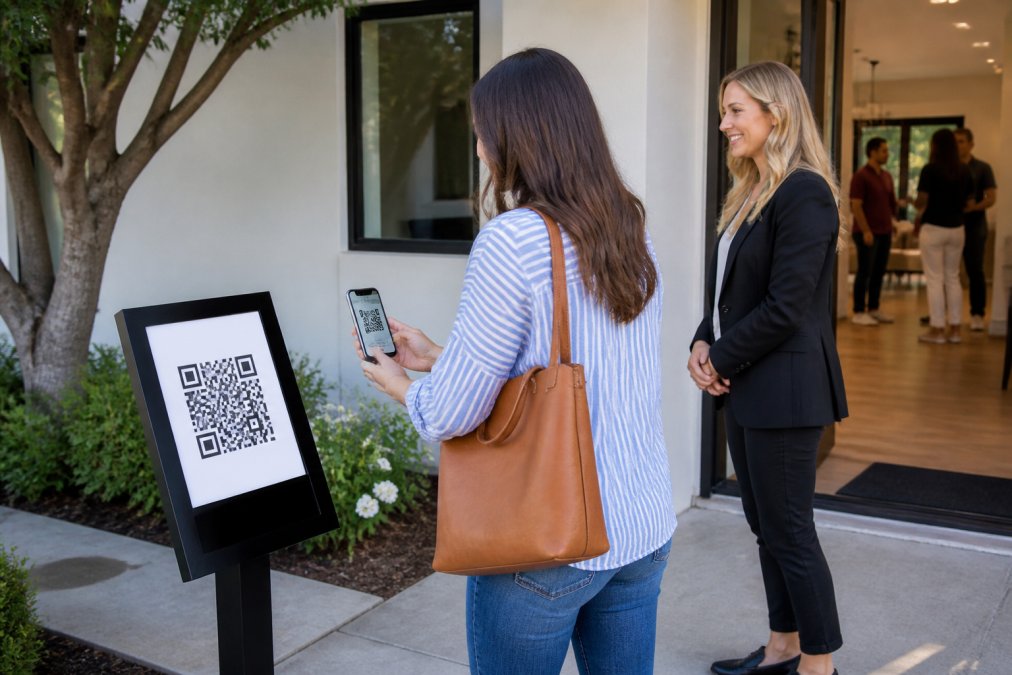
ohACCESS replaces the paper sheet with a QR code posted at the door. Visitors scan it, fill a short form on their own phone, and instantly receive two codewords, one by text and one by email. They share a codeword with the host agent to enter, which proves the phone number and email they entered are real and theirs. No app, no account, nothing to install.
The practical difference is data quality. Paper sheets collect illegible handwriting and fake numbers. ohACCESS flags VoIP/burner numbers, bounced emails, undeliverable texts, and STOP opt-outs (opt-outs honored globally), then delivers every verified sign-in into your CRM automatically through a formatted lead email or a Zapier webhook.
Digital Open House Check-In Best Practices for Lead Capture
Digital open house check-in best practices start with verification: capture a phone number and email you can actually reach, then get that lead into your CRM before you leave the property.
- Post the QR code where visitors see it before they reach the door
- Keep the form short: name, email, phone, buying timeline
- Add one custom question that qualifies intent
- Confirm verification happens at the door, not after
- Check that leads landed in your CRM the same day
- Send a thank-you follow-up within 24 hours
A common mistake is treating check-in as a formality. Agents who convert open house traffic treat it as the first touch of a follow-up sequence. ohACCESS sends an automatic next-morning thank-you email to visitors and a post-event lead report email to the agent, removing two manual steps.
Cost-Benefit Analysis: Virtual Tour ROI and Lead Quality
Virtual tour ROI depends less on the tour itself than on what you do with the traffic it generates. A premium tour that produces views but no contactable leads is a marketing expense; a tour paired with verified check-in is a lead generation channel. The difference shows up in one number: cost per verified lead.
The Cost-Per-Verified-Lead Framework
Stop measuring tours by views. Measure them by the contacts you can actually call:
- Total tour spend, the per-listing fee, subscription, or capture cost for the period.
- Verified contacts captured, visitors whose phone number and email you can reach, not raw view counts.
- Cost per verified lead = total spend ÷ verified contacts.
- Follow-up conversion rate, how many of those verified contacts turn into showings or offers.
A tour that generates 40 views and zero follow-up-ready contacts returns nothing. A check-in flow that captures 15 verified visitors with real phone numbers returns 15 conversations. The tour is only as valuable as the list it produces.
Where Each Provider's Cost Actually Lands
Zillow Showcase charges a per-listing fee or subscription, and costs vary by market. Matterport offers a limited free tier with paid plans above it. iGuide prices per project. ohACCESS runs on published, flat pricing: the first 25 sign-ins are free as a trial, with every feature included and no credit card required. After that, pricing depends on the plan chosen (Pro, Team, or Brokerage). Pricing never varies with how many open houses or visitors you run, no volume discounts, no usage-based surprises.
That flat structure matters for ROI math. Per-listing and per-project fees scale with your inventory, so a busy month inflates tour spend even if lead quality stays flat. A flat subscription keeps cost per verified lead predictable as volume rises.
The Hidden Cost Nobody Prices In: Data Ownership
Here is the gap most ROI guides skip: your tour asset and your lead data have different lifespans, and only one is portable.
- Tour assets, 3D models, floor plans, and hosted media, usually live on the provider's servers. If you cancel, switch platforms, or the listing is removed, you may lose access to the hosted version. Export terms, hosting duration, and re-capture costs vary sharply by provider. Switching later often means re-capturing the property from scratch.
- Lead data, the verified contacts you captured, should be yours to keep and move. ohACCESS gives you CSV export and delivers every sign-in into your CRM automatically through a formatted lead email or a Zapier webhook, so your contact list travels with you. ohACCESS also runs a 3-year automatic data-retention purge.
Before you commit to any tour provider, confirm the export terms, hosting duration, and what happens to your 3D models if you cancel. For your lead-capture layer, confirm you can export the list and route it into your own CRM. The provider that locks up your leads quietly raises your true cost per lead.
Mobile-First Experience and Accessibility Compliance
Mobile optimization is where provider differences become obvious. Buyers browse listings on phones, and a tour that stutters on a mid-range Android device loses the click before the walkthrough starts. This section covers what breaks on mobile, how to troubleshoot it, and which format is more accessible.
How Mobile Buyers Actually Interact With Each Tour Type
The interaction model differs more than the visuals:
- Zillow Showcase performs well inside the Zillow app, where the platform controls the experience. The trade-off is that the experience is tuned for that app, not for your own site or MLS.
- Matterport renders high-definition 3D that looks best on capable hardware and a strong connection. On older phones or weak cellular signal, load time and navigation quality drop.
- iGuide's value, accurate floor plans and dimensions, translates cleanly to mobile because the data is lightweight. Buyers who want measurements before touring get them fast.
- QR-code check-in is inherently mobile-first: the visitor uses their own phone, on their own cellular data, with no app to download and no account to create. The form is available in 16 languages, and returning visitors are remembered for a year with their info pre-filled.
Technical Troubleshooting: When Tours and Check-In Break
Most guides tell you whether integrations work; few tell you how to fix them when they don't. A common pattern is a tour that loads on desktop but fails to embed on a mobile listing page. Work through these in order:
- Test on a real device over cellular data, not Wi-Fi and not a desktop preview. Load time and navigation on a mid-range phone tell you more than any desktop check.
- Check the embed code and hosting terms. Some providers restrict where their media can be embedded. If a tour will not render on your site or MLS, confirm the embed is permitted before assuming a technical fault.
- Isolate the layer that failed. If the tour loads but the check-in form does not, the problem is in the check-in flow, not the tour. If the form submits but no lead arrives, check the CRM intake address or Zapier connection.
- Verify the lead actually landed. Do not assume a submitted form equals a delivered lead. Confirm the sign-in reached your CRM the same day.
- Keep a fallback. If a tour embed breaks mid-listing, have a direct link ready so buyers are not left with a blank frame.
Accessibility Compliance: The Question Nobody Asks
Accessibility compliance deserves more attention than it gets. If your property marketing relies on interactive 3D tours, check whether the provider offers text alternatives, keyboard navigation, and screen-reader support. A tour that excludes buyers with disabilities narrows your audience and invites fair-housing scrutiny. Ask providers directly for their accessibility documentation before you commit.
A practical rule: the more a tour depends on precise pointer interaction and heavy rendering, the harder it is to make accessible. Lightweight formats, floor plans, dimensions, and text descriptions, are easier to navigate with assistive technology. Pair any immersive tour with a text-based property description so buyers who cannot use the 3D experience still get the essential facts.
Conclusion
The hard part isn't choosing a tour format. It's making sure the buyers who tour your listing become leads you can actually reach, and that's where most virtual tour investments quietly fail. ohACCESS closes that gap with verified QR-code check-in, two-codeword verification by text and email, automatic lead delivery to your CRM, and one-tap seller reports that show turnout without exposing visitor details. Start Free with ohACCESS and turn every open house into a verified lead list.
Frequently Asked Questions
Are Zillow Showcase listings worth the investment?
Zillow Showcase boosts visibility within Zillow search results. It works best for agents who already get most of their leads from Zillow and want higher engagement on that platform. If your leads come from multiple sources, a standalone virtual tour provider like Matterport or iGuide gives you more flexibility to share tours across MLS, your website, and social media without being tied to one platform.
Can you use Matterport tours with Zillow Showcase?
Yes, Matterport integrates with Zillow, so your 3D tour can appear on your Zillow listing. However, Zillow Showcase is a separate premium product that adds enhanced placement and branding within Zillow's ecosystem. You can use Matterport for the tour itself and still pay for Showcase to get the extra visibility. Just check that your Matterport tour meets Zillow's technical specifications for embedding before you upgrade.
What is the best virtual tour platform for real estate agents who also need open house check-in?
The best setup pairs a virtual tour provider for listing marketing with a dedicated open house check-in tool for lead capture. Matterport or iGuide handles the 3D tour and floor plans, while ohACCESS replaces the paper open house sign-in sheet with verified digital check-in. Visitors scan a QR code, fill a short form on their phone, and receive two codewords by text and email. They tell a codeword to the host agent to enter, which proves their contact info is real. The agent gets an instant alert and a verified visitor log.
How do virtual tours impact listing engagement and lead quality?
Virtual tours increase listing engagement by making properties accessible to buyers who cannot visit in person. More page views and saves often follow. But engagement metrics alone do not tell you whether the buyer is serious. Pairing a virtual tour with a verified open house check-in process gives you both: the tour drives interest, and the check-in captures verified phone numbers and emails so you know which visitors are real buyers with a timeline.
Frequently asked questions
Are Zillow Showcase listings worth the investment?
Zillow Showcase boosts visibility within Zillow search results. It works best for agents who already get most of their leads from Zillow and want higher engagement on that platform. If your leads come from multiple sources, a standalone virtual tour provider like Matterport or iGuide gives you more flexibility to share tours across MLS, your website, and social media without being tied to one platform.
Can you use Matterport tours with Zillow Showcase?
Yes, Matterport integrates with Zillow, so your 3D tour can appear on your Zillow listing. However, Zillow Showcase is a separate premium product that adds enhanced placement and branding within Zillow's ecosystem. You can use Matterport for the tour itself and still pay for Showcase to get the extra visibility. Just check that your Matterport tour meets Zillow's technical specifications for embedding before you upgrade.
What is the best virtual tour platform for real estate agents who also need open house check-in?
The best setup pairs a virtual tour provider for listing marketing with a dedicated open house check-in tool for lead capture. Matterport or iGuide handles the 3D tour and floor plans, while ohACCESS replaces the paper open house sign-in sheet with verified digital check-in. Visitors scan a QR code, fill a short form on their phone, and receive two codewords by text and email. They tell a codeword to the host agent to enter, which proves their contact info is real. The agent gets an instant alert and a verified visitor log.
How do virtual tours impact listing engagement and lead quality?
Virtual tours increase listing engagement by making properties accessible to buyers who cannot visit in person. More page views and saves often follow. But engagement metrics alone do not tell you whether the buyer is serious. Pairing a virtual tour with a verified open house check-in process gives you both: the tour drives interest, and the check-in captures verified phone numbers and emails so you know which visitors are real buyers with a timeline.
Keep reading
Start free with 25 verified check-ins. No credit card required.
Start Free