Open House App for Team Collaboration Features

Table of Contents
- What Team Collaboration Features Should an Open House App Have?
- Quick Comparison: Open House Apps for Teams
- CRM Integration for Real Estate Leads: How Sign-Ins Reach Your Database
- Real Estate Team Lead Management Tools: Routing, Dashboards, and Post-Event Analytics
- How ohACCESS Handles Team Collaboration at the Door
- What to Ignore When Shopping for an Open House App
- Frequently Asked Questions
Last Updated: September 28, 2026
What Team Collaboration Features Should an Open House App Have?
An open house app for team collaboration should do three things: verify every sign-in is real, route each lead to the right agent automatically, and give the team a shared record of who walked through the door. Everything else is decoration.
Verified Check-In vs. a Shared Spreadsheet
A shared spreadsheet fails at the front door. Anyone can write a fake name, a disconnected number, or an email that bounces, and the hosting agent has no way to check while greeting visitors.
Lead Routing, Alerts, and Permission Levels
Routing matters more than most teams expect. A sign-in that lands in a shared inbox three days later is a dead lead; one that pings the right agent's phone within seconds is a conversation.
Look for:
- Instant text and email alerts to the hosting agent
- A team dashboard showing every member's activity
- Permission levels so team leads see everything and individual agents see their own
- A verified visitor log the whole team can reference
- CSV export so data isn't trapped in one tool
Quick Comparison: Open House Apps for Teams
| Tool | Starting Price | Team Features | Best For |
|---|---|---|---|
| ohACCESS | Free trial (25 sign-ins); Team flat $120/mo | Verified check-in, team dashboard, CRM lead delivery | Teams needing verified data |
| Open House Wizard | Pricing depends on quantity, dates, and delivery | Multi-agent hosting, lead scoring | Individual lead qualification |
| Happy Open House | Pricing depends on quantity, dates, and delivery | Team and brokerage tiers | Structured tiered plans |
| HouseBuddy | Pricing depends on quantity, dates, and delivery | Co-hosting lead splitting | Frequent co-hosted events |
| Chime | Pricing depends on quantity, dates, and delivery | Full CRM with open house tools | All-in-one CRM users |
Most tools in this space were built for a single agent and bolted on team features later, which shows up in how leads get routed and how dashboards are structured.
CRM Integration for Real Estate Leads: How Sign-Ins Reach Your Database
CRM integration for real estate leads works best with zero manual steps. The sign-in should land in your database without the agent touching anything, no copy-paste from a paper sheet, no retyping a phone number from a photo, no "I'll enter it Monday" backlog.
1. Formatted lead email to your CRM's lead-intake address
This is the most reliable method, and the one most teams rely on. The app sends a formatted lead email to the CRM's lead-intake address, labeled so the CRM parses it into fields automatically. The lead shows up as a contact with name, email, phone, and buying timeline already populated.
2. Zapier webhook
A Zapier webhook covers the long tail. If your team runs a less common CRM, a custom database, or a spreadsheet-based pipeline, Zapier connects the app to thousands of other tools without a one-off integration. It's the escape hatch that keeps you from being locked out of a good check-in tool because your brokerage standardized on something unusual five years ago.
3. Team CRM forwarding
This is the piece most single-agent tools skip, and it matters most for a team. A team lead can copy every member's leads into one shared team CRM. Without it, each agent's open house data lives in isolation and the brokerage never sees the full picture, no team-level reporting, no shared follow-up, no way to catch a lead falling through the cracks.
What to ask a vendor before you buy
- Which CRMs have you verified the lead email against?
- Does the lead arrive as a parsed contact, or as a raw email your team has to read?
- Is there a Zapier path for less common CRMs?
- Can a team lead forward every member's leads into one shared database?
- If the integration breaks, how will we know?
A team that can answer those five questions has a CRM pipeline. A team that can't is running a contact list with extra steps.
Real Estate Team Lead Management Tools: Routing, Dashboards, and Post-Event Analytics
Real estate team lead management tools live or die on what happens after the event. The sign-in is the easy part; follow-up is where deals are won, and most teams have no idea which agents actually convert the leads they capture.
Routing: get the lead to the right agent in seconds
Routing matters more than most teams expect. A sign-in that lands in a shared inbox three days later is a dead lead; one that pings the right agent's phone within seconds is a conversation.
Look for:
- Instant text and email alerts to the hosting agent
- A team dashboard showing every member's activity
- Permission levels so team leads see everything and individual agents see their own
- A verified visitor log the whole team can reference
- CSV export so data isn't trapped in one tool
Permission-based access levels: the feature nobody talks about
Permission-based access levels are the most overlooked feature in this category, and almost no competitor addresses them directly. Without them, either everyone sees everything, creating privacy problems and lead-ownership disputes, or nobody sees enough, defeating the point of a team account.
A workable model has three tiers:
- Team lead / broker: sees every agent's sign-ins, can forward leads into a shared team CRM, manages the roster, and controls shared branding.
- Agent: sees their own sign-ins and verified visitor log, with private notes that stay private.
- Assistant / ISA: sees the leads they're assigned, without access to the full team's pipeline.
Post-event team performance analytics: the gap most tools ignore
This is where the category is weakest, and where a team can separate itself from solo-agent tools that bolted on a team tier. Lead capture is table stakes; measuring what the team did with those leads is the actual job.
- Which agents hosted events and how many verified visitors each captured
- The buying-timeline breakdown for each event (0-3, 3-6, 6-12, 12+ months)
- The scan-to-registration funnel, how many scanned the QR code versus completed the form
- Aggregate buyer intent across the team's events
- After Tour feedback, the average 1-10 home rating and price verdict (Too High / Reasonable / Too Low), rolled up across the team
The seller-facing side of analytics
There's a second audience for post-event data: the homeowner. A one-tap Seller Report shows aggregate turnout, registered-visitor count, how many plan to buy within six months, the buying-timeline breakdown, the scan-to-registration funnel, the average home rating, and the price verdict, without exposing a single visitor's name, phone number, email, or arrival time.
How ohACCESS Handles Team Collaboration at the Door
ohACCESS replaces the paper sign-in sheet with verified digital check-in. A visitor scans a QR code at the door, fills out a short form on their own phone, and instantly receives two codewords: one by text message and one by email. They tell a codeword to the host agent to enter the property. The visitor never types anything into a system.
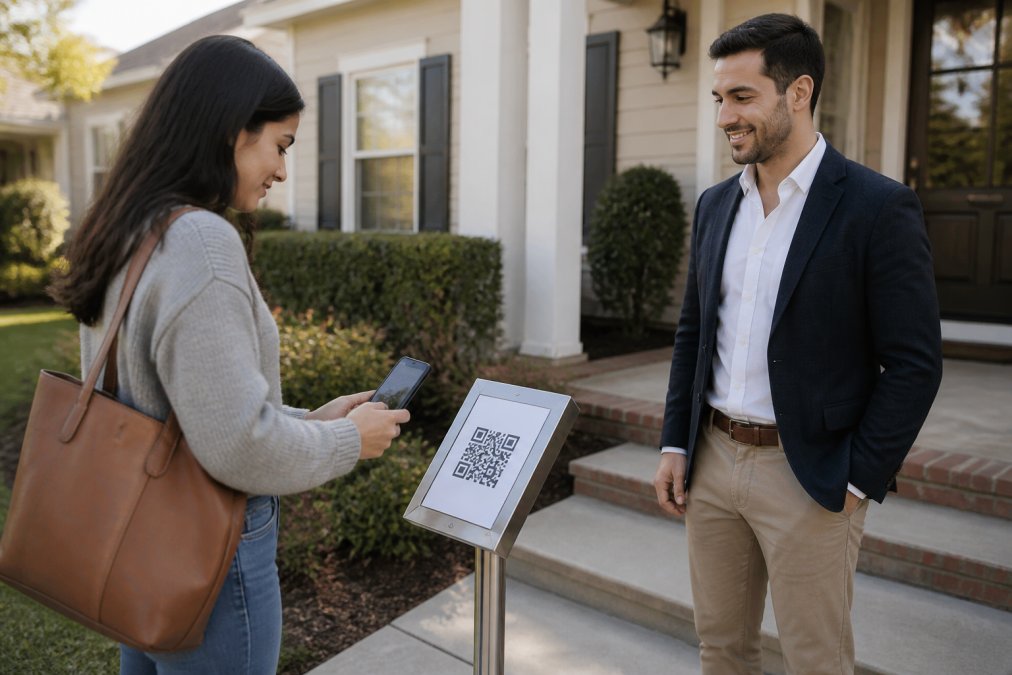
The Verified Codeword Flow, Step by Step
- The visitor scans the QR code, printed on a pedestal or a-frame sign outside the home.
- They complete a short form: name, email, phone, and buying timeline.
- ohACCESS sends two codewords instantly, one by text and one by email.
- The visitor tells a codeword to the host agent at the door.
- The agent receives an instant text and email alert with the visitor's details.
The text codeword is primary and the email codeword is the backup if the text is slow. Visitors with international phone numbers receive their codeword through WhatsApp, and the form is available in 16 languages.
What to Ignore When Shopping for an Open House App
Ignore features that only work in a demo. The open house happens on a Saturday with a line at the door, and anything that adds friction at that moment is a liability.
Skip:
- Tablet or kiosk modes that require carrying hardware to every showing
- Offline modes that promise to sync later, which usually means lost leads
- Codeword expiry timers that confuse a visitor who's slow to arrive
- Built-in drip campaigns when your CRM already handles follow-up
Frequently Asked Questions
What features should a real estate team look for in an open house app?
Prioritize verified check-in that confirms a phone number and email are real, automatic lead delivery to your CRM, instant alerts to the right agent, and permission-based access so team members see only what they need. An open house app for team collaboration features should also support multiple agents at one event, shared branding, and post-event reporting. Test the sign-in flow yourself before committing, and confirm how leads move from the app into your contact database without manual data entry.
Can open house apps automatically send leads to a team CRM?
Some do, but the mechanism matters. ohACCESS delivers every sign-in into your CRM automatically through a formatted lead email sent to the CRM's intake address, a Zapier webhook, or team CRM forwarding, so a team lead can copy every member's leads to a shared database. It does not use a native API sync or field mapping. Ask any vendor exactly how leads travel from the sign-in form to your contact database before you buy.
How do team dashboards help manage multiple open house events?
A team dashboard shows every agent's events in one view, so a broker can see who is hosting, how many verified visitors registered, and which leads still need follow-up. ohACCESS includes team and brokerage dashboards with roster management and shared branding. Combined with post-event analytics, this lets you compare agent productivity and spot which listings generate the most buyer interest, without chasing individual agents for numbers.
How much does an open house app for teams cost?
Pricing varies by vendor and team size. ohACCESS publishes flat rates: Pro for solo agents, a Team plan for 2 to 10 agents, and a Brokerage plan for 11 to 100 agents priced per agent. The first 25 visitor registrations are free with every feature included and no credit card, which functions as a free trial rather than an ongoing free plan. Check ohACCESS's website for current pricing before you decide.
Frequently asked questions
What features should a real estate team look for in an open house app?
Prioritize verified check-in that confirms a phone number and email are real, automatic lead delivery to your CRM, instant alerts to the right agent, and permission-based access so team members see only what they need. An open house app for team collaboration features should also support multiple agents at one event, shared branding, and post-event reporting. Test the sign-in flow yourself before committing, and confirm how leads move from the app into your contact database without manual data entry.
Can open house apps automatically send leads to a team CRM?
Some do, but the mechanism matters. ohACCESS delivers every sign-in into your CRM automatically through a formatted lead email sent to the CRM's intake address, a Zapier webhook, or team CRM forwarding, so a team lead can copy every member's leads to a shared database. It does not use a native API sync or field mapping. Ask any vendor exactly how leads travel from the sign-in form to your contact database before you buy.
How do team dashboards help manage multiple open house events?
A team dashboard shows every agent's events in one view, so a broker can see who is hosting, how many verified visitors registered, and which leads still need follow-up. ohACCESS includes team and brokerage dashboards with roster management and shared branding. Combined with post-event analytics, this lets you compare agent productivity and spot which listings generate the most buyer interest, without chasing individual agents for numbers.
How much does an open house app for teams cost?
Pricing varies by vendor and team size. ohACCESS publishes flat rates: Pro for solo agents, a Team plan for 2 to 10 agents, and a Brokerage plan for 11 to 100 agents priced per agent. The first 25 visitor registrations are free with every feature included and no credit card, which functions as a free trial rather than an ongoing free plan. Check ohACCESS's website for current pricing before you decide.
Keep reading
Start free with 25 verified check-ins. No credit card required.
Start Free