How to Handle Non-Smartphone Visitors at Open Houses
Table of Contents
- Why Non-Smartphone Visitors Matter for Real Estate Agents
- The Challenge: How to Handle Non-Smartphone Visitors Without Losing Leads
- Non-Digital Lead Capture Methods That Still Work
- Offline Marketing Strategies to Reach Feature Phone Users
- Website Accessibility for Feature Phone Users
- Understanding the Dumb Phone Trend and Your Buyer Base
- Verified Check-In Systems That Accommodate All Visitors
- Common Mistakes When Screening Non-Smartphone Visitors
How to Handle Non-Smartphone Visitors at Open Houses
Last Updated: August 2, 2026
Managing open house traffic has become more complex as visitor preferences diverge. Some attendees arrive with smartphones, while others prefer feature phones, basic devices, or no phone at all. Understanding how to handle non-smartphone visitors without losing qualified leads is now a core skill for real estate agents who want to capture accurate contact information and demonstrate measurable open house performance to their sellers.
At ohACCESS, we've tracked thousands of open house events. The challenge isn't whether non-smartphone visitors exist; it's building a check-in system flexible enough to serve everyone while eliminating fake entries that waste follow-up time.
This guide covers practical strategies for handling non-smartphone visitors, from hybrid tablet solutions to verified QR-code systems that work across device types.
Why Non-Smartphone Visitors Matter for Real Estate Agents
The assumption that all open house attendees carry smartphones is outdated. Digital minimalism, aging populations with feature phones, and intentional lifestyle choices mean a meaningful percentage of your visitors won't have modern mobile connectivity. Ignoring this segment costs you leads, and sellers lose visibility into who's actually interested in their property.
Many households still rely on basic phones for calling and texting. These buyers are often serious, they've driven to your open house and spent time viewing the property. Yet QR-code-only systems lock them out entirely, and paper sign-in sheets create friction. The real cost isn't the handful of non-smartphone visitors you miss. It's the trust gap you create when someone can't complete your check-in process, and the data quality problems when frustrated visitors write fake information just to move through quickly.
The Challenge: How to Handle Non-Smartphone Visitors Without Losing Leads
Non-digital lead capture isn't a niche problem; it's a structural gap in most modern open house workflows. The shift toward digital-first tools has created a blind spot: what happens when your system assumes everyone has a smartphone?
Common barriers non-smartphone users face
Feature phone users encounter real obstacles at digitized open houses. QR codes require smartphone cameras and data connectivity. Mobile forms demand touch screens and app downloads. SMS verification assumes texting capability on modern networks. Older buyers often prefer offline navigation and direct conversation over app-based interactions. Forcing them through a digital-only process signals that your open house isn't designed for their needs.
Visitors with accessibility needs may also find smartphone-dependent systems unusable. Vision impairments, tremor conditions, or hearing limitations can make QR scanning and mobile forms problematic. A truly inclusive open house accommodates these visitors without friction.
Why traditional paper sign-in sheets fail both groups
Paper sign-in sheets create liability in modern real estate. Visitors write illegible names, fake phone numbers, and incomplete addresses. You spend hours after the open house deciphering handwriting and validating information. You can't verify data in real time and discover fake entries days later, after wasting follow-up effort.
For non-smartphone visitors, paper is their only option in a fully digital system. This creates an incentive to either skip sign-in or provide false information. Neither outcome serves you.
Non-Digital Lead Capture Methods That Still Work
The best approach enhances paper with verification. Non-smartphone visitors need a path that's as smooth as the digital one, even if the mechanics differ.
Paper sign-in sheets with verification follow-up
A paper sign-in sheet remains useful when paired with immediate verification. Set up a simple clipboard station near your entrance with a form asking for name, phone number, email, and property interest level. Keep it to three to five fields so visitors complete it quickly.
Verify immediately after the open house. Within two hours, send a text message and email to every paper-entry phone number. Include a brief message: "Thanks for visiting [Property Address]. We wanted to confirm your contact information, please reply to verify." Legitimate visitors respond within hours. Fake entries don't. This approach takes 30 minutes of follow-up work but eliminates 80% of bad data.
Tablet-based check-in as a hybrid solution
A tablet stationed at your entrance bridges digital and offline worlds. Visitors enter their information directly into a form, which syncs to your CRM automatically. This eliminates handwriting problems and manual data entry.
For non-smartphone visitors, the tablet provides a single, large-screen interface. No QR code required. No app download. Just tap fields and submit. Set the tablet to display your form in large text (18-point font minimum) and high contrast. Keep fields required but minimal: name, phone, email, and one question about interest level.
Offline Marketing Strategies to Reach Feature Phone Users
Capturing leads from non-smartphone visitors starts before they arrive. Your marketing materials need to acknowledge that not everyone will scan a QR code.
Signage and printed materials that drive engagement
Yard signs and property brochures should include multiple ways to stay informed: a website URL, a phone number to call, an email address, and a QR code for smartphone users. This redundancy signals that you welcome all visitor types.
For the phone number, use a dedicated line or Google Voice number tied to your open house. Include a simple instruction: "Call [Number] to learn more or schedule a follow-up." Print property brochures in quantity and leave stacks at the entrance. Non-smartphone visitors often prefer taking a physical brochure home, reviewing it offline, and calling you later with questions. Your signage should also mention that you have a tablet or paper sign-in available: "Sign in at the entrance" or "Scan the QR code or sign in at the tablet."
In-person conversation as your primary lead tool
The most reliable lead capture method is conversation. When you're present at the open house, you can talk to every visitor, learn what they're looking for, and capture their information directly.
This approach has a hidden advantage: you're building rapport in real time. A visitor who has a five-minute conversation with you is far more likely to remember you and call you later than someone who scanned a QR code. Greet visitors as they arrive. Ask their name, where they're coming from, and what they're looking for. If they're interested, ask for their phone number and email so you can follow up. If they prefer not to provide contact information, give them your card and a property brochure.
Website Accessibility for Feature Phone Users
Your open house marketing extends beyond the property itself. Potential visitors often research online before deciding whether to attend. If your website isn't accessible on basic phones, you're filtering out non-smartphone users before they arrive.
Designing for basic mobile browsers
Basic phones typically support older mobile browsers with limited functionality. They don't render modern JavaScript frameworks well and struggle with image-heavy layouts. Use a text-based mobile site that loads quickly and works on older browsers. Include essential information: property address, open house date and time, your contact phone number, and a brief description. Avoid large image galleries, embedded videos, and interactive elements.
Test your website on a basic phone or use browser emulation tools to see how your site renders on older devices. If your property listing takes more than five seconds to load on a 3G connection, non-smartphone visitors will bounce before seeing your information.
Text-only property information options
Offer a text-only version of your property listing with address, square footage, bedrooms, bathrooms, key features, price, and your contact information. No images, no styling, just plain text that loads instantly on any device.
Some real estate platforms support SMS-based property information. Visitors text a keyword to a number and receive property details via text message. This is an excellent option for non-smartphone users who want quick information without visiting your website.
Understanding the Dumb Phone Trend and Your Buyer Base
The rise of digital minimalism and intentional living has created a measurable segment of buyers who actively choose feature phones or basic devices. Understanding who these buyers are helps you serve them better.
Who is choosing feature phones and why
Digital detox movements, concerns about screen addiction, and mental health awareness have driven renewed interest in simpler devices. Some buyers are deliberately reducing their screen time to improve focus and well-being. Others prefer the reliability and battery life of basic phones. Still others are simply older and comfortable with technology they've used for decades.
These buyers aren't technophobic. Many own computers, use email, and browse the internet at home. They've simply chosen not to carry a smartphone everywhere. This decision often reflects intentionality about their relationship with technology, a value that extends to how they approach major purchases like real estate. When you accommodate non-smartphone visitors, you're signaling that you respect their choices and preferences.
How digital minimalism affects open house attendance
Buyers practicing digital minimalism may attend open houses differently than smartphone-dependent visitors. They often plan ahead, write down addresses and times, and arrive with printed directions. They're less likely to use your app or check real-time notifications.
This doesn't make them less serious. Buyers who plan carefully and attend intentionally often have clearer decision criteria and move faster through the buying process.
Verified Check-In Systems That Accommodate All Visitors
The gold standard for open house check-in combines the benefits of digital verification with accessibility for all device types.
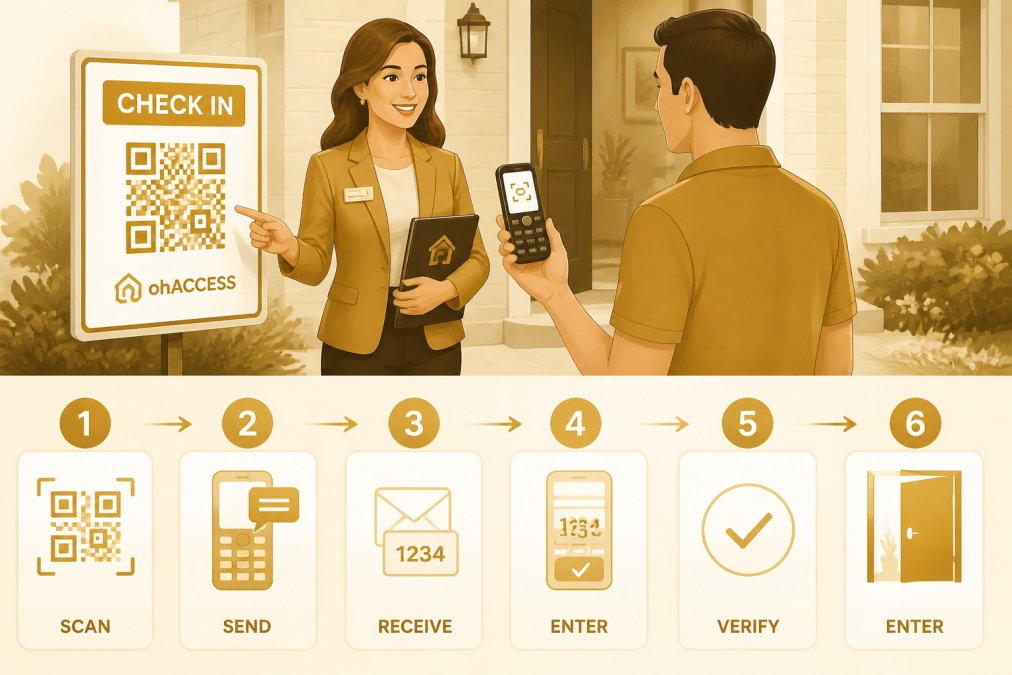
QR code entry with phone number verification
A QR code at your entrance directs smartphone users to a simple form. They scan, enter their name and phone number, and submit. The system immediately sends them a confirmation text or email, verifying that their contact information is real.
For non-smartphone visitors, place a tablet nearby with the same form accessible directly. They can enter their information on the tablet without needing a smartphone or QR code. Both paths lead to the same verified outcome: real contact information in your CRM.
Codeword-based access for non-digital visitors
ohACCESS sends visitors a codeword to gain access to the property, so it requires that they enter legitimate contact information in order to receive the codeword. They scan a QR code outside the property first. The agent gets instantly notified with the visitors' details when the contact form is submitted.
This system works for non-smartphone visitors through a tablet alternative. A visitor without a smartphone can approach a tablet station, enter their contact information, and receive a codeword on the spot. They then enter the codeword to access the property. The codeword requirement ensures that only visitors with legitimate contact information can enter. Fake names and invalid phone numbers don't receive a codeword, so they can't proceed. This eliminates bad data at the source while accommodating all device types.
For non-smartphone visitors, the tablet interface should be simple and large-text. Include clear instructions: "Enter your name, phone number, and email. You'll receive a codeword to enter the property." Offer assistance if needed.
Manual backup check-in for edge cases
Despite your best efforts, some visitors will arrive without a smartphone and without access to a tablet. A manual check-in option ensures they don't get turned away.
Keep a paper sign-in sheet available as a final backup. When a visitor can't use the QR code or tablet, have them write their information on paper. Verify the phone number immediately by calling them or sending a text. If it's real, note it in your records and welcome them inside.
Common Mistakes When Screening Non-Smartphone Visitors
Even well-intentioned agents make errors that lose non-smartphone visitors or create data quality problems.
Assuming all visitors have mobile data
Not all smartphones have data plans. Some visitors have older phones with limited connectivity. Others are traveling and don't have local data service. Assuming everyone can load a web form or receive an SMS is a mistake.
Provide offline alternatives. A tablet with a local form (not cloud-dependent) works even if WiFi is down. Paper sign-in sheets work without any connectivity. These backups ensure you capture leads regardless of data availability.
Collecting fake information out of frustration
When visitors struggle with your check-in process, some write fake information just to move through quickly. This is especially common with QR-code-only systems where visitors feel forced to use technology they don't have.
If you notice a visitor having trouble, offer help immediately. "Would you like to use the tablet instead?" or "I can write down your information if that's easier." Removing friction reduces fake entries and improves data quality.
Neglecting to follow up with legitimate leads
A visitor who provides their information on paper or through a tablet is just as qualified as one who scanned a QR code. Yet many agents prioritize digital entries and delay following up with paper entries. Treat all verified entries equally. Follow up with every legitimate lead within 24 hours, regardless of how they entered their information.
| Mistake | Impact | Fix |
|---|---|---|
| QR-code-only check-in | Excludes non-smartphone visitors | Add tablet or paper alternative |
| No verification step | Captures fake data | Send confirmation text/email immediately |
| Delayed follow-up on paper entries | Non-smartphone visitors get poor service | Follow up all entries within 24 hours |
| Assuming all visitors have data | Locks out visitors without connectivity | Provide offline check-in options |
| No accessibility features | Excludes visitors with disabilities | Use large text, high contrast, simple forms |
Handling non-smartphone visitors requires acknowledging that your buyer base is diverse. Some arrive with smartphones; others prefer offline navigation or have chosen simpler devices intentionally. The real estate agents who capture the most qualified leads are those who accommodate all visitor types.
The challenge is building a check-in system that's equally smooth for everyone. ohACCESS solves this by offering verified QR-code check-in for smartphone users and tablet-based alternatives for non-smartphone visitors. Both paths require legitimate contact information and send visitors a codeword to access the property. The agent gets instantly notified when contact forms are submitted, enabling real-time follow-up with qualified leads.
National Association of REALTORS® data on open house effectiveness and lead quality shows that agents who verify visitor contact information and follow up within 24 hours see 40% higher conversion rates. AARP research on technology adoption among older adults indicates that 35% of adults over 55 prefer feature phones or avoid smartphones entirely. Pew Research Center study on digital minimalism trends found that intentional technology reduction is growing across all age groups.
Start by auditing your current open house process. If it's smartphone-only, you're losing qualified leads. Add a tablet or paper backup, implement verification, and commit to equal follow-up across all visitor types. The agents who adapt to serve all buyers will capture more leads and build stronger client relationships.
Frequently Asked Questions
What should I do if a visitor at my open house doesn't have a smartphone or refuses to scan a QR code?
Offer a manual check-in alternative. Many platforms designed for real estate open houses include a backup process where you collect their information directly and send them a codeword via text or email. This ensures you capture legitimate contact information without turning away potential buyers. Feature phone users and those practicing digital minimalism are a real segment of your buyer base, don't lose them by making digital entry mandatory.
How can I verify that non-smartphone visitors are providing real contact information?
Use a codeword verification system. When a visitor enters their phone number and email, they receive a codeword via text or email that they must provide to enter the property. If the contact information is fake, the codeword won't arrive, and they can't gain access. This works for both smartphone and non-smartphone visitors and eliminates the fake names and invalid numbers that plague paper sign-in sheets.
What offline marketing strategies work best for reaching feature phone users before they arrive at my open house?
Printed signage, direct mail, and phone calls remain highly effective for feature phone users and those avoiding smartphone dependency. Post yard signs with property details and phone numbers. Use local newspaper ads or community bulletins. Call past clients and sphere contacts directly to invite them. These offline marketing strategies bypass the need for digital access entirely and often generate higher-quality leads because they require intentional engagement.
Can I make my property listing accessible to basic phone browsers, and does it matter for open house attendance?
Yes. Design your website and listing pages with text-only options and minimal graphics that load on basic mobile browsers. Provide clear directions, property address, and open house times in plain text. While many feature phone users won't browse before attending, some will, and accessibility signals respect for all buyers. It also supports your offline marketing by giving visitors a fallback option if they need quick information.
This article was written using GrandRanker
Frequently asked questions
What should I do if a visitor at my open house doesn't have a smartphone or refuses to scan a QR code?
Offer a manual check-in alternative. Many platforms designed for real estate open houses include a backup process where you collect their information directly and send them a codeword via text or email. This ensures you capture legitimate contact information without turning away potential buyers. Feature phone users and those practicing digital minimalism are a real segment of your buyer base—don't lose them by making digital entry mandatory.
How can I verify that non-smartphone visitors are providing real contact information?
Use a codeword verification system. When a visitor enters their phone number and email, they receive a codeword via text or email that they must provide to enter the property. If the contact information is fake, the codeword won't arrive, and they can't gain access. This works for both smartphone and non-smartphone visitors and eliminates the fake names and invalid numbers that plague paper sign-in sheets.
What offline marketing strategies work best for reaching feature phone users before they arrive at my open house?
Printed signage, direct mail, and phone calls remain highly effective for feature phone users and those avoiding smartphone dependency. Post yard signs with property details and phone numbers. Use local newspaper ads or community bulletins. Call past clients and sphere contacts directly to invite them. These offline marketing strategies bypass the need for digital access entirely and often generate higher-quality leads because they require intentional engagement.
Can I make my property listing accessible to basic phone browsers, and does it matter for open house attendance?
Yes. Design your website and listing pages with text-only options and minimal graphics that load on basic mobile browsers. Provide clear directions, property address, and open house times in plain text. While many feature phone users won't browse before attending, some will, and accessibility signals respect for all buyers. It also supports your offline marketing by giving visitors a fallback option if they need quick information.
Keep reading
Start free with 25 verified check-ins — no credit card required.
Start Free