How to Clean Up Polluted CRM Data: 7 Steps

Table of Contents
- Why Polluted CRM Data Costs You Real Money
- Step 1: Conduct a CRM Data Audit Checklist
- Step 2: Identify and Remove Duplicate Records
- Step 3: Standardize Data Entry and Formatting
- Step 4: Archive Dead Contacts and Inactive Records
- CRM Data Hygiene Best Practices for Long-Term Health
- How to Prevent Fake Leads in Real Estate at the Source
- Choosing the Right CRM Data Cleansing Tools
Last Updated: August 17, 2026
Why Polluted CRM Data Costs You Real Money
Polluted CRM data silently kills your real estate business. Bad contact information, duplicate records, and inconsistent formatting tank your conversion rates, waste follow-up time, and destroy your ability to spot real leads from tire-kickers.
When your CRM is full of junk, you're chasing ghosts. You spend hours calling numbers that don't work, emailing addresses that bounce, or following up with duplicate contacts already contacted multiple times. Your team loses trust in the data. Your reporting becomes unreliable. Real estate agents who let their CRM data degrade typically lose 15-25% of their follow-up effectiveness.
Paper sign-in sheets at open houses are the primary culprit. Visitors write illegible names, fake phone numbers, and outdated emails. You manually enter this data and introduce typos in the process. Over time, your CRM becomes a graveyard of unusable contact information.
The solution isn't just one cleanup project. It's a system that prevents pollution at the source while systematically removing what's already there. Below, we'll walk you through exactly how to clean up polluted CRM data in seven steps, plus how to prevent it from happening again.
Step 1: Conduct a CRM Data Audit Checklist
Before you start deleting anything, you need to know exactly what you're dealing with. A data audit is your baseline.
Start by running a report on your total contact count. Then filter for these red flags:
- Missing phone numbers or emails. Count how many records have blank fields. These are dead weight.
- Obvious fake data. Look for entries like "John Smith," "123 Main Street," "555-0000," or "test@test.com." Flag them for deletion.
- Duplicate records. Search for contacts with the same phone number or email address. Real estate attracts duplicates because couples visit together or someone visits multiple times.
- Formatting inconsistencies. Phone numbers stored as "(555) 123-4567" versus "555-123-4567" won't match when identifying duplicates.
- Dead or inactive records. Contacts you haven't touched in 12+ months. Archive them rather than delete them.
- Mismatched data. A contact marked as a "buyer" but with a commercial property address signals data entry errors.
Create a simple spreadsheet to document your findings:
| Issue Type | Count | Priority | Action |
|---|---|---|---|
| Missing phone/email | 342 | High | Delete or request via re-engagement |
| Obvious fake data | 87 | High | Delete immediately |
| Duplicate records | 156 | High | Merge or consolidate |
| Formatting inconsistencies | 1,204 | Medium | Standardize and reformat |
| Inactive 12+ months | 521 | Medium | Archive |
| Mismatched data | 93 | Medium | Review and correct |
This audit tells you exactly where your time should go.

Step 2: Identify and Remove Duplicate Records
Duplicates are the easiest win in your cleanup. They're also the most damaging because they inflate your contact count and cause you to contact the same person multiple times.
Real estate duplicates happen for legitimate reasons. A couple visits an open house together, one person signs in, then the other. Or someone visits the same property twice. Your CRM needs to catch these automatically.
Start with an exact match search. Look for records with identical phone numbers and email addresses. These are definite duplicates; merge them into a single contact and delete the duplicate. Keep the record with the most complete information.
Then search for fuzzy matches. Someone named "Mike Johnson" and "Michael Johnson" with the same phone number are the same person. These require manual review, but they're worth finding.
When you merge duplicates, keep the record with the most recent activity, most complete information, and correct property association. Delete the duplicate and update any notes or activity history to the master record. Most CRMs have a merge function that does this automatically.
A common mistake is deleting duplicates without consolidating notes. If contact A has notes "visited on 3/15, very interested in the neighborhood" and contact B has notes "asked about schools," you need both notes on the merged record.
Step 3: Standardize Data Entry and Formatting
Inconsistent formatting breaks your ability to segment, report, and automate. When phone numbers are stored five different ways, your CRM can't recognize duplicates or match records across systems.
Pick a format and enforce it:
- Phone numbers: Store as 10-digit format without special characters (5551234567) or with consistent formatting ((555) 123-4567).
- Email addresses: Convert all to lowercase. Emails are case-insensitive, but standardizing prevents duplicates.
- Names: Use "First Name, Last Name" format consistently.
- Addresses: Use a consistent format for street, city, state, zip.
- Property information: Standardize how you record which property a contact visited.
- Lead source: Don't mix "Open House," "open house," "OH," and "property showing." Pick one label.
Most CRMs have bulk update tools. Use them to apply formatting rules in minutes rather than manually editing hundreds of entries. For phone numbers, use a tool that reformats automatically. For emails, a find-and-replace to lowercase takes seconds.
After standardization, your duplicates will become visible. Merge them.
Step 4: Archive Dead Contacts and Inactive Records
Not all bad data needs to be deleted. Some of it just needs to be archived.
A dead contact is someone you cannot reach or who is no longer a prospect. This includes phone numbers that are disconnected, email addresses that bounce, contacts who asked not to be contacted, contacts with no activity for 12+ months, and contacts who moved out of your market.
Archiving keeps these records for historical reporting without cluttering your active pipeline. It also protects you legally if someone asks to be removed from your list.
Create an "Archived" or "Inactive" status in your CRM. Don't delete the record; change its status. Then filter your active reports to exclude archived contacts. Now your pipeline shows only actionable leads.
For contacts with invalid phone numbers or bounced emails, try one re-engagement attempt before archiving. If they don't respond, archive them.
CRM Data Hygiene Best Practices for Long-Term Health
Cleanup is a one-time project. Hygiene is a system. The difference between agents who have clean data and agents who don't is process.
Establish data entry rules before contacts ever enter your CRM. If you're still using paper sign-in sheets at open houses, you've already lost. Paper creates manual entry, which creates typos, which creates pollution.
Assign responsibility for data quality. One person on your team needs to own this. Run a data quality report monthly. Spend 30 minutes identifying and fixing formatting issues, duplicates, and invalid records. Monthly maintenance takes an hour.
Implement validation rules in your CRM. Most platforms allow you to set required fields, email format validation, and phone number validation. If someone tries to enter a contact without a phone number, the system rejects it.
Use automation to flag problems. Set up workflows that identify contacts with missing phone or email, duplicate phone numbers or emails, contacts with no activity in 90 days, and records with obviously fake data.
How to Prevent Fake Leads in Real Estate at the Source
The best cleanup is the one you never need. Preventing polluted CRM data means stopping fake leads before they enter your system.
Paper sign-in sheets are the enemy. Someone can write "Mickey Mouse" and "555-0000" and walk in. You manually transcribe it, and now your CRM has junk.
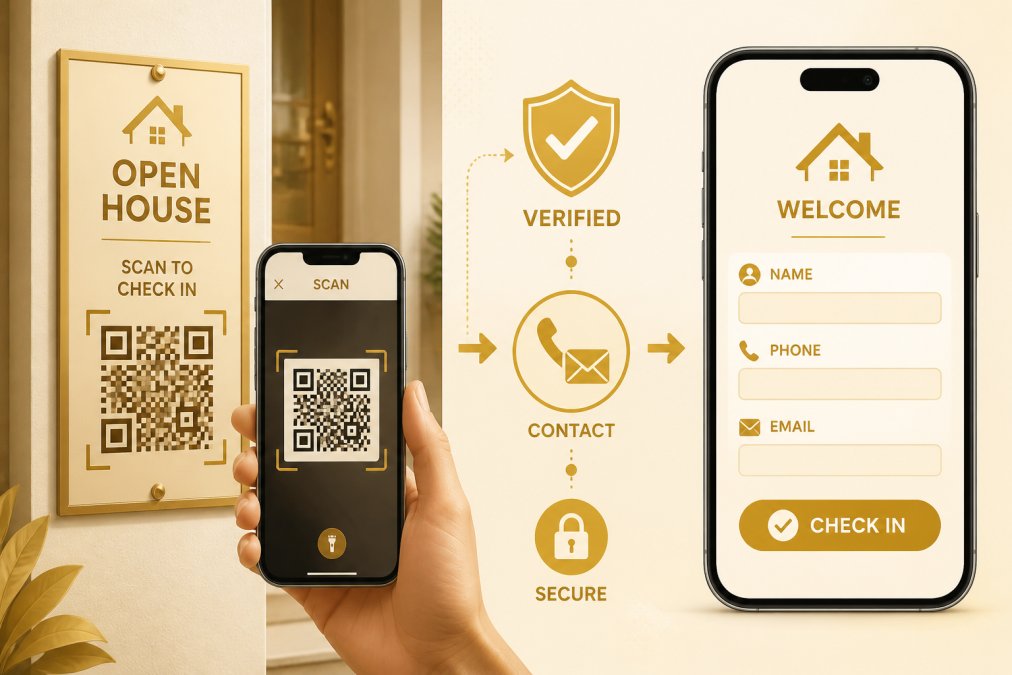
Digital check-in systems solve this by requiring verification. When a visitor scans a QR code at your open house, they enter their phone number and email. The system sends them a codeword to confirm they own that phone and email. No codeword, no entry. Fake information means they can't get in.
This single step eliminates the vast majority of junk leads. Real buyers want to see the property, so they'll provide real information.
The second layer is integration. When a verified visitor enters their information, that data should sync directly to your CRM automatically. No manual entry, no typos, no delays.
ohACCESS uses this exact approach. Visitors scan a QR code outside the property first. They verify their contact information through a codeword system. Their details appear instantly in your CRM. The agent gets instantly notified with the visitors details when the contact form is submitted. No fake names, no invalid numbers, no manual data entry. The data is clean from the moment it enters your system.
A third prevention layer is segmentation. Someone buying in the next three months is a warmer lead than someone twelve months out. Your check-in system should capture this context — every ohACCESS sign-in records the visitor's stated buying timeline.
Choosing the Right CRM Data Cleansing Tools
You can clean your CRM manually, but tools make the job faster and more accurate.
Built-in CRM tools are your first option. Most major CRM platforms have native duplicate detection and bulk update features. If your CRM has these, use them before buying anything else.
For more advanced needs, third-party data cleansing tools can help. These platforms specialize in finding duplicates, standardizing formatting, and validating contact information. If you have thousands of records and limited time, they're worth the investment.
Look for tools that offer duplicate detection and merging, automatic formatting standardization, email and phone validation, bulk updates, integration with your CRM, and audit trails.
For open house lead capture specifically, a digital check-in platform like ohACCESS prevents pollution before it starts. Instead of dealing with cleanup later, you capture clean data from the moment a visitor arrives. The system requires verified contact information, so fake leads never make it into your CRM.
The total cost of prevention is usually lower than the total cost of cleanup plus the lost productivity from bad data in your pipeline.
Polluted CRM data is fixable, but prevention is smarter than cure. Start with an audit to understand your current problem. Then systematically remove duplicates, standardize formatting, and archive dead records. But the real win is stopping pollution at the source. When you capture verified contact information at your open houses and sync it directly to your CRM, you eliminate the work entirely. Get started with ohACCESS and capture clean, qualified leads from day one, no manual data entry, no fake information, no cleanup headaches later.
Frequently Asked Questions
What is CRM data pollution and why does it happen?
CRM data pollution occurs when your database accumulates duplicate records, outdated contacts, formatting inconsistencies, and invalid information. In real estate, this happens through manual data entry errors at open houses, leads entering fake information to avoid follow-up, duplicate entries when the same prospect attends multiple showings, and contacts becoming inactive over time. Polluted data degrades lead quality, wastes agent time on unqualified prospects, and skews your understanding of actual buyer interest. The longer data sits uncleaned, the worse the problem becomes.
How often should you perform a CRM data cleanup?
Real estate agents should conduct a full data audit quarterly and perform ongoing maintenance weekly. Weekly maintenance involves removing obviously bad entries, archiving contacts who have not engaged in 12 months, and correcting formatting errors as they appear. A quarterly deep dive tackles duplicate records, standardizes all field entries, and validates email deliverability. High-volume agents doing 3-4 open houses per week should implement automated validation at the point of entry to prevent pollution before it starts, reducing the need for manual cleanup.
How can you prevent fake leads from entering your real estate CRM?
The most effective prevention happens at capture. Require phone and email verification before lead entry, if someone enters a fake number, they cannot complete the check-in process. Use QR code verification systems that send a codeword to the provided contact information; only legitimate contact details receive the code. This eliminates fake names and invalid information at the source rather than requiring cleanup later. For open house check-ins specifically, this verification step takes seconds but filters out bad actors and ensures every lead in your CRM is genuinely interested and contactable.
What are the best tools for automated CRM data cleansing?
Effective CRM data cleansing tools fall into two categories: automation at capture and cleanup after the fact. At-capture tools prevent pollution by verifying contact information before it enters your system, this is far more efficient than cleaning data later. Post-capture tools identify duplicates, standardize formatting, flag inactive records, and validate email addresses. For real estate agents, the most practical approach combines verified lead capture (preventing fake data upfront) with your CRM's built-in deduplication and field standardization features. Many CRMs include basic cleansing; premium tools add automated workflows that run on a schedule.
This article was written using GrandRanker
Frequently asked questions
What is CRM data pollution and why does it happen?
CRM data pollution occurs when your database accumulates duplicate records, outdated contacts, formatting inconsistencies, and invalid information. In real estate, this happens through manual data entry errors at open houses, leads entering fake information to avoid follow-up, duplicate entries when the same prospect attends multiple showings, and contacts becoming inactive over time. Polluted data degrades lead quality, wastes agent time on unqualified prospects, and skews your understanding of actual buyer interest. The longer data sits uncleaned, the worse the problem becomes.
How often should you perform a CRM data cleanup?
Real estate agents should conduct a full data audit quarterly and perform ongoing maintenance weekly. Weekly maintenance involves removing obviously bad entries, archiving contacts who have not engaged in 12 months, and correcting formatting errors as they appear. A quarterly deep dive tackles duplicate records, standardizes all field entries, and validates email deliverability. High-volume agents doing 3-4 open houses per week should implement automated validation at the point of entry to prevent pollution before it starts, reducing the need for manual cleanup.
How can you prevent fake leads from entering your real estate CRM?
The most effective prevention happens at capture. Require phone and email verification before lead entry—if someone enters a fake number, they cannot complete the check-in process. Use QR code verification systems that send a codeword to the provided contact information; only legitimate contact details receive the code. This eliminates fake names and invalid information at the source rather than requiring cleanup later. For open house check-ins specifically, this verification step takes seconds but filters out bad actors and ensures every lead in your CRM is genuinely interested and contactable.
What are the best tools for automated CRM data cleansing?
Effective CRM data cleansing tools fall into two categories: automation at capture and cleanup after the fact. At-capture tools prevent pollution by verifying contact information before it enters your system—this is far more efficient than cleaning data later. Post-capture tools identify duplicates, standardize formatting, flag inactive records, and validate email addresses. For real estate agents, the most practical approach combines verified lead capture (preventing fake data upfront) with your CRM's built-in deduplication and field standardization features. Many CRMs include basic cleansing; premium tools add automated workflows that run on a schedule.
Keep reading
Start free with 25 verified check-ins. No credit card required.
Start Free