How to Host a Hybrid Real Estate Open House
Last Updated: October 27, 2026
Quick Summary
A hybrid open house runs an in-person showing and a live virtual tour at the same time, so local and remote buyers can both take part. Success depends on choosing a platform your remote buyers already use, using a two-camera setup with a lavalier mic, testing bandwidth and the full stack the day before, and splitting roles between a door host and a virtual host.
- Match the streaming platform to the platform your remote buyers already use.
- Use two cameras: a stable tour camera and a fixed wide shot as a fallback.
- Run a full dry run at the property the day before the event.
- Assign one person to moderate the live chat and relay questions.
- Split the event into a door host and a virtual host with a run of show.
Table of Contents
- What a Hybrid Open House Is and Who It Serves
- Preparing the Listing and Your Real Estate Open House Checklist
- Setting Up the Virtual Side: Live Stream, Tour, and Equipment
- Running Check-In With Verified QR Sign-Ins
- How Long the Event Should Run and How to Staff It
- Following Up With Visitors Using a Follow-Up Email Template
- Sending the Seller Report and Booking Your Next Hybrid Open House
- Frequently Asked Questions
What a Hybrid Open House Is and Who It Serves
A hybrid open house runs an in-person showing and a live virtual tour at the same time. Local buyers walk through the home while remote buyers watch a live stream and ask questions in real time.
Independent agents can host hybrid events, listing agents can show homes to clients who cannot travel, and brokers can standardize one process across events.
Hybrid events involve planning for both audiences and a reliable connection.
Preparing the Listing and Your Real Estate Open House Checklist
Start with the listing itself. Clean photos, a clear description, strong curb appeal, and staging that feels move-in ready draw more serious buyers before they ever see the stream.
Build your checklist early. Include these core items:
- Confirm the date, start time, and end time
- Order open house signage and directional arrows
- Print or post your QR sign at the entrance
For a fuller checklist you can copy and adapt, see our Real Estate Open House Checklist For Agents.
Setting Up the Virtual Side: Live Stream, Tour, and Equipment
The virtual half of a hybrid open house fails for predictable reasons: shaky video, dead audio, dropped streams, and remote questions nobody sees. Treat the stream as a second showing that happens to share an address with the first, and build it deliberately.
Pick the platform your remote buyers already use
Matterport's overview of live video open house platforms lists Zoom, Instagram, and Facebook Live as common choices, and Realtor.com's guidance on live virtual tours and QR codes in hybrid open houses recommends live virtual tours so remote buyers can engage during the event. The practical rule: match the platform to your list, not to your preference. If your out-of-town buyers are mostly on Facebook, stream to Facebook.
Build a two-camera setup, not a walking phone
A single handheld phone produces the nausea-inducing walkthrough that kills remote attendance. A workable hybrid rig is modest:
- Camera A (the tour camera): a phone or tablet on a gimbal or stable tripod for the guided walkthrough. Lock exposure and focus so the image does not hunt between a bright kitchen and a dim hallway.
- Camera B (the wide shot): a second phone on a tripod at the back of the main living space, framing the room and front door. It is your fallback whenever Camera A repositions and shows remote viewers the event's foot traffic and energy.
- Audio: a clip-on lavalier mic for the host. Onboard phone mics pick up HVAC hum, echo, and side conversations. Test from the farthest corner of the property.
Plan bandwidth and camera angles before the day
Bandwidth is the most common hybrid failure, and it is almost always an upload problem. Run a speed test at the property during the same time of day as the event. If upload is marginal, drop the stream resolution rather than the frame rate, choppy motion reads as amateur, a slightly softer image does not. Keep the router in line of sight of the tour camera and avoid streaming from a finished basement or garage where signal dies.
Camera angles matter more than gear. A common pattern:
- Open on the wide shot and the exterior, then hand off to the tour camera.
- Walk the route you would walk a live buyer: entry, main living space, kitchen, primary suite, then secondary rooms.
- Pause two to three seconds in each doorway so remote viewers can orient before you move.
Run live chat and remote questions with a dedicated moderator
A stream without a moderator is a broadcast, not an open house. Assign one person to watch the chat, relay questions to the host through a text thread or shared note, and answer the easy ones directly (square footage, HOA dues, school assignments, offer deadline). Batch substantive questions, roof age, HVAC, disclosures, for the host to answer on camera at a natural pause.
Test the full stack the day before
Run a complete dry run at the property: both cameras, the mic, the hotspot, the platform, the chat, and the check-in QR. Walk the route, speak the script, and watch the playback. The day-before test catches echo, dead zones, and platform problems while you still have time to fix them.
The core setup for a hybrid open house comes down to a few key choices, summarised below.
| Setup item | What to do | Why it matters |
|---|---|---|
| Platform | Match the platform to your remote buyers' list | Reaches the people you want to watch |
| Event link | Create at least 48 hours ahead | Gives time to promote it |
| Tour camera | Phone on gimbal or tripod, exposure and focus locked | Stable image for remote viewers |
| Wide shot | Second phone at back of main living space | Fallback when the tour camera repositions |
| Audio | Clip-on lavalier mic for the host | Avoids HVAC hum and echo |
| Backup connection | Hotspot on a different carrier than Wi-Fi | Protects a two-hour stream |
| Dry run | Full test at the property the day before | Catches echo, dead zones and platform issues |
Running Check-In With Verified QR Sign-Ins
Check-in is where a hybrid event either works or falls apart. The old paper sign-in sheet can include fake names and bad phone numbers. ohACCESS replaces paper open-house sign-in sheets with verified digital check-in.
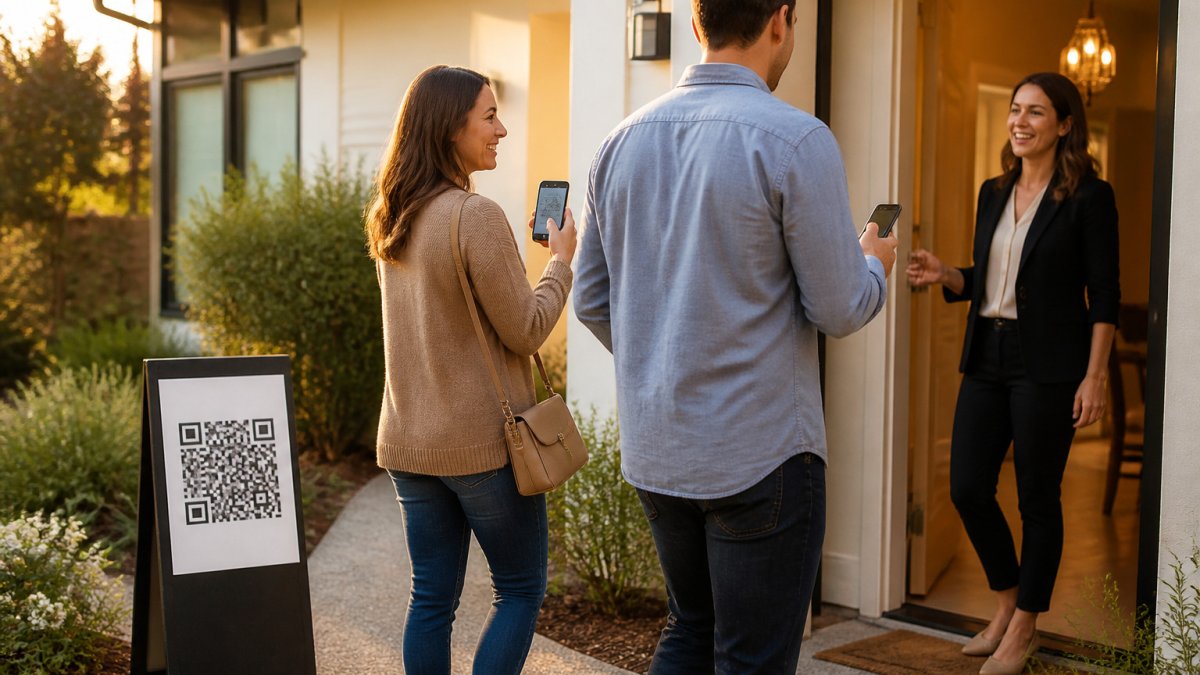
A visitor scans the QR code at the door and fills out a short form on their own phone: name, email, phone, and buying timeline. It is available in 16 languages, so most visitors can read it comfortably.
Once the form is submitted, the visitor receives two codewords, one by text and one by email. The agent then gets an instant text and email alert for each sign-in. That gives you a running verified visitor log instead of a stack of illegible paper.
Sending Codewords and Admitting Visitors at the Door
Here is exactly how the codeword step works:
- The visitor submits the form on their phone.
- ohACCESS sends two codewords at once, one by text and one by email.
- The visitor tells a codeword to the host agent at the door to enter.
The text codeword is the primary one. If the text is slow, the email codeword works as a backup. Visitors never type a codeword into any app or screen. They simply say it to you. Because the codeword goes to the phone number and email the visitor entered, it proves those contact details are real and belong to them.
Visitors with non-US/Canada phone numbers receive their codeword by WhatsApp.
How Long the Event Should Run and How to Staff It
Our Open House Follow-Up Timing: A Step-by-Step Guide covers how timing affects what happens afterward. What changes in a hybrid format is the staffing model.
Dual-host the event: one door, one stream
Two people with two clearly separated jobs can divide responsibilities at a hybrid open house.
- The door host owns the entry. They greet visitors, confirm the codeword at the door, watch the verified visitor log fill in, answer in-person questions, and manage the physical flow of the home so rooms do not bunch up.
- The virtual host owns the stream. They run the tour camera, moderate chat, relay remote questions to the door host, and keep the wide shot live whenever the tour camera is repositioning.
A solo agent can run a hybrid event. If you are solo, consider streaming part of the event and letting the rest be in-person only rather than doing both jobs at once.
Write a run of show, not a start time
A run of show is a one-page timeline that both hosts can see. A common pattern:
- T-30 minutes: both hosts on site, cameras and mic tested, chat open, check-in QR sign posted at the door, stream link live but not yet promoted.
- T-0: virtual host opens with the wide shot and exterior; door host admits the first arrivals and confirms codewords.
- First 30 minutes: guided walkthrough on the tour camera; virtual host pins the QR link and property details in chat.
Plan the handoff and the breaks
The handoff is where hybrid events quietly break. Agree in advance on a signal, a text, a raised hand, a shared note, that means "take the stream" or "take the door." When the door host needs a break, the virtual host takes the wide shot; when the virtual host resets a camera, the door host pauses admissions for 60 seconds rather than letting a line form at an unstaffed door.
Schedule breaks the way you would for any two-person event: one host covers while the other steps away, and neither leaves the door or the stream unattended. A second person is not a luxury in a hybrid event; it is what lets the first person do either job properly.
Match staffing to expected traffic
Use your registration count and your last event's walk-in rate to plan staffing. Brokerages running multiple hybrid events on the same weekend can standardize roles so agents know their responsibilities.
Following Up With Visitors Using a Follow-Up Email Template
Follow-up is one step in working with leads. Use a short, friendly template that thanks visitors and invites questions.
Here is a simple template to adapt:
Subject: Thanks for visiting [Property Address]
Hi [First Name],
Thank you for coming to the open house at [Property Address] today. I hope you enjoyed the home. If you have any questions about the property, the neighborhood, or the buying process, just reply to this email.
I can also set up a private showing at a time that works for you.
Best, [Your Name] [Phone Number]
Keep the message short and personal, and mention something specific from the visit when you can. ohACCESS also sends each visitor a next-morning thank-you email automatically, so you have a second touch without extra work. For more on timing and building a usable contact list, read How Do You Build a Database From Open House Visitors?
Leads also flow into your CRM automatically through a formatted lead email or a Zapier webhook. ohACCESS does not sync directly with your CRM or tag or score leads for you, so set up your follow-up sequence there.
Sending the Seller Report and Booking Your Next Hybrid Open House
After the event, share a one-tap Seller Report with your client.
The report is aggregate only. It does not show visitor names, phone numbers, emails, or arrival times.
Once the seller has the report, you can schedule your next event.
ohACCESS offers a free trial that covers your first 25 sign-ins with every feature included and no credit card required.
Frequently Asked Questions
What is a hybrid real estate open house?
A hybrid real estate open house runs an in-person event at the property at the same time as a live virtual tour for buyers who cannot attend. The in-person visitors sign in on their own phones, and the virtual audience joins through a video platform such as Zoom, Instagram Live, or Facebook Live. Realtor.com recommends live virtual tours and QR codes as part of this model. The model combines an in-person event with a live virtual tour.
How long should a real estate open house last?
Keep the same start and end time across the in-person and virtual sides, announce it in your marketing, and stay on site for the full window.
How do I follow up with open house visitors after a hybrid event?
Send a short thank-you email the next morning that mentions the property and asks one specific question, such as whether the buyer's timeline is 0-3, 3-6, 6-12, or 12+ months. ohACCESS sends an automatic next-morning thank-you email to visitors, and it delivers each sign-in to your CRM as a formatted lead through a lead email or a Zapier webhook.
What technology do I need for a virtual open house?
You need a stable internet connection, a phone or camera that can stream live video, and a video platform your audience already uses. Add a tripod or stabilizer, and a second device to monitor chat questions from remote viewers. For check-in, visitors use their own smartphones to scan a QR code, so you do not need a tablet or kiosk. Keep a backup battery and confirm the stream before guests arrive.

Frequently asked questions
What is a hybrid real estate open house?
A hybrid real estate open house runs an in-person event at the property at the same time as a live virtual tour for buyers who cannot attend. The in-person visitors sign in on their own phones, and the virtual audience joins through a video platform such as Zoom, Instagram Live, or Facebook Live. Realtor.com recommends live virtual tours and QR codes as part of this model. The model combines an in-person event with a live virtual tour.
How long should a real estate open house last?
Keep the same start and end time across the in-person and virtual sides, announce it in your marketing, and stay on site for the full window.
How do I follow up with open house visitors after a hybrid event?
Send a short thank-you email the next morning that mentions the property and asks one specific question, such as whether the buyer's timeline is 0-3, 3-6, 6-12, or 12+ months. ohACCESS sends an automatic next-morning thank-you email to visitors, and it delivers each sign-in to your CRM as a formatted lead through a lead email or a Zapier webhook.
What technology do I need for a virtual open house?
You need a stable internet connection, a phone or camera that can stream live video, and a video platform your audience already uses. Add a tripod or stabilizer, and a second device to monitor chat questions from remote viewers. For check-in, visitors use their own smartphones to scan a QR code, so you do not need a tablet or kiosk. Keep a backup battery and confirm the stream before guests arrive.
Keep reading
Start free with 25 verified check-ins. No credit card required.
Start Free