How to Stop Fake Open House Leads: A Real Estate Agent's Guide
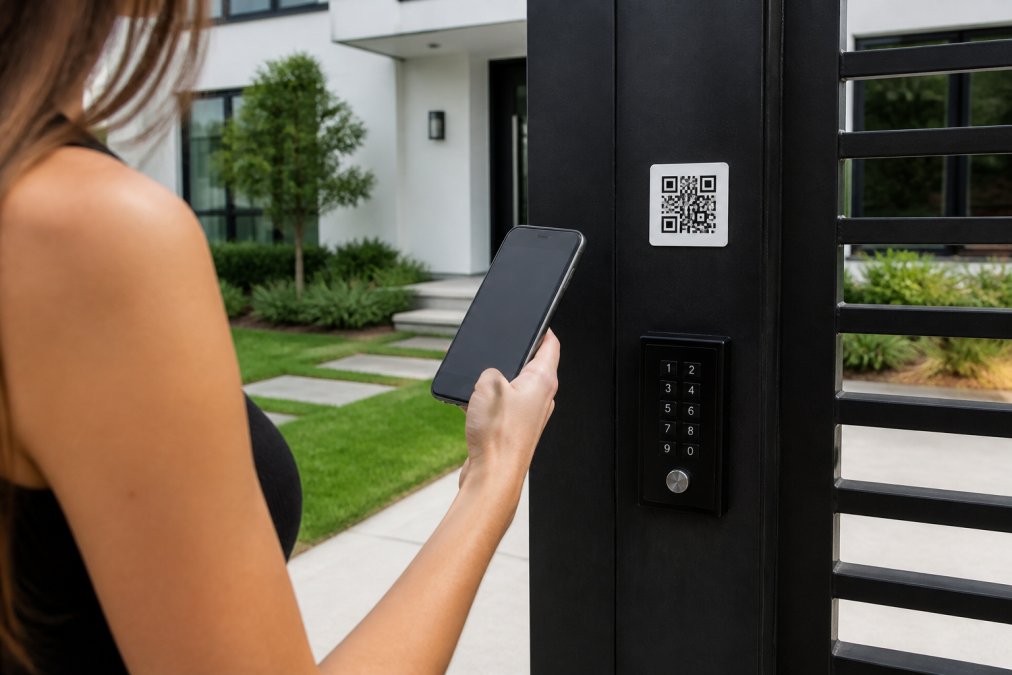
Table of Contents
- Why Fake Open House Leads Cost You Time and Money
- Best Digital Open House Sign-In Apps to Prevent Fake Leads
- Verification Protocols: Spot Fake Contact Information Before It Enters Your CRM
- How to Follow Up with Open House Leads and Separate Real Buyers from Time Wasters
- Real Estate Open House Sign-In Sheet Templates and CRM Integration
- Automated CRM Filtering to Remove Low-Quality and Duplicate Leads
- Common Open House Mistakes That Invite Fake Leads
- Conclusion
Last Updated: August 6, 2026
Why Fake Open House Leads Cost You Time and Money
Fake open house leads waste hours on invalid contacts and pollute your CRM with garbage data. When someone enters a fake name, disconnected phone number, or bouncing email, you've lost the time spent on that open house without capturing a qualified prospect.
The cost compounds quickly. You spend hours sending follow-up messages to dead ends. Your CRM metrics become unreliable, making it harder to demonstrate open house value to sellers. Many agents report spending 3-5 hours per week cleaning data and chasing leads that never convert.
The first 24 hours after an open house are critical, buyer intent is highest and the property is fresh in their minds. But if your lead list is contaminated with fake entries, you're wasting those golden hours on contacts that don't exist.
The solution is prevention, not cleanup. By implementing verification protocols at check-in, you eliminate fake leads before they enter your system. Platforms like ohACCESS use a QR code verification system: visitors scan a code outside the property, enter their details, and receive two codewords — one by text, one by email — to gain entry. No codeword means no fake lead in your CRM.
Best Digital Open House Sign-In Apps to Prevent Fake Leads
The best digital open house sign-in apps verify contact information before adding leads to your CRM. Paper sheets and basic digital forms invite the exact problem you're trying to solve.
ohACCESS stands out by combining verification with automation. Visitors scan the QR code outside your property, fill in their contact details, and receive one-time codewords via text and email. They share a codeword with the host agent to gain access. Fake information equals no codeword, which means no entry and no fake lead in your system.
This verification-first approach eliminates fake names and invalid contact information before they pollute your CRM. You save time by removing manual data entry entirely. You also get automatic CRM integration and one-tap seller reports showing open house performance and buyer interest.
Other digital sign-in platforms exist, but most rely on voluntary accuracy or manual verification. They're faster than paper, but they don't solve the core problem: preventing bad data from entering your system in the first place.
Verification Protocols: Spot Fake Contact Information Before It Enters Your CRM
Phone and Email Validation at Check-In
The moment a visitor provides contact information, you need immediate validation. Real verification happens in real time.
A phone number that doesn't accept SMS or a fake email address should trigger a rejection before that lead touches your CRM. The best approach uses automated validation: the system sends a code to the phone number or email address the visitor provides. If the code bounces back, the entry is flagged or rejected. If the code is received and entered correctly, you know the contact is real.
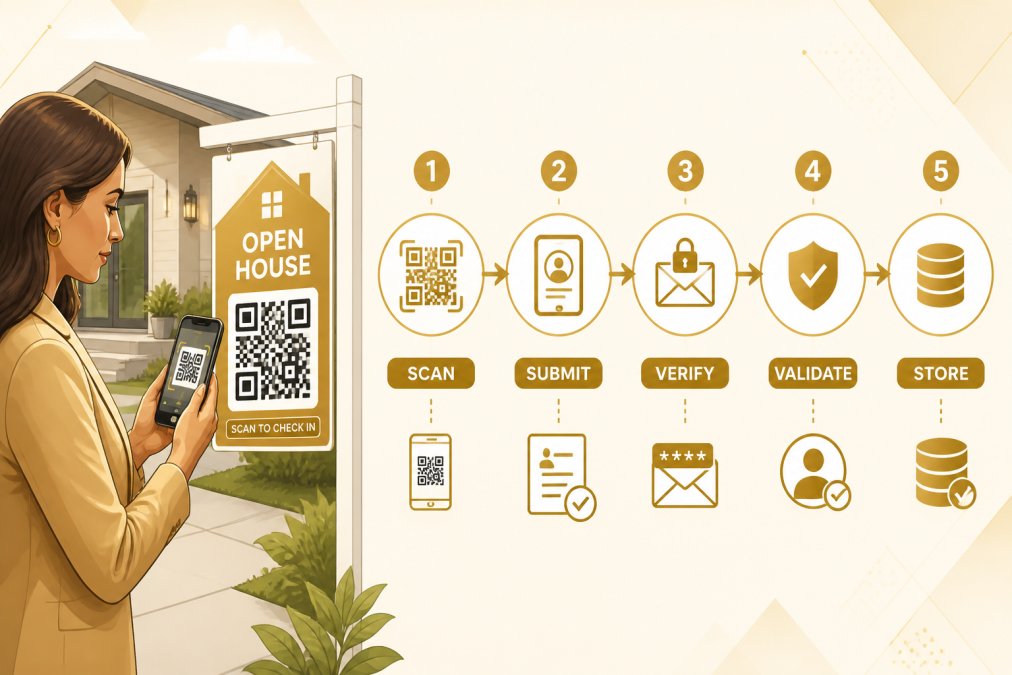
Those 30 seconds of validation prevent hours of wasted follow-up. A phone number that doesn't validate is a red flag, either the visitor entered it wrong (and will correct it), or they gave you a fake number (and you've stopped a fake lead before it entered your system).
ohACCESS sends two codewords — one via SMS, one via email — to verify both the phone number and email address are active and owned by the visitor. No codeword received means the contact information failed validation; the visitor can't enter without correcting it. This automated verification ensures every lead in your CRM has been validated at the point of entry.
Psychological Red Flags in Visitor Behavior
Beyond data validation, certain behavioral patterns indicate a visitor is unlikely to be a serious buyer.
Real buyers ask specific questions: square footage, lot size, property taxes, school district, renovation timeline, or neighborhood amenities. They examine the home carefully, take photos, and ask about comparable sales.
Fake visitors show different patterns. They provide minimal information during check-in and rush through the property. They don't ask questions or engage with listing details. They avoid eye contact or seem uncomfortable providing actual contact information.
The most reliable red flag is evasiveness about contact information. Someone who hesitates to provide a phone number or gives an email they "don't check often" is signaling low intent. Real buyers want you to follow up.
Another pattern: visitors who arrive in groups but only one person provides contact information often indicate curiosity-driven traffic rather than serious buyer interest. Serious buyers typically visit alone or with a spouse or partner directly involved in the purchase decision.
Timing matters too. Visitors who arrive in the last 10 minutes and spend only 2-3 minutes inside are unlikely to convert. Serious buyers spend 15-30 minutes examining the property.
These behavioral observations combined with data validation create a two-layer filter that stops obvious fakes and helps you prioritize which leads deserve immediate attention.
How to Follow Up with Open House Leads and Separate Real Buyers from Time Wasters
Same-Day Text and Email Follow-Up Window
Buyer intent peaks in the 2-4 hours immediately after an open house. After 24 hours, your response becomes less urgent. After 48 hours, most casual visitors have moved on.
Same-day follow-up is non-negotiable for lead generation that converts. Text and email within the first 2-4 hours of the open house ending, not the next morning.
A same-day text should be brief, personal, and specific to the property: "Hi [Name], thanks for visiting [Property Address] today. I'd love to answer any questions you have about the home or neighborhood. What was your biggest takeaway from the showing?"
This text confirms the contact information is real and re-engages the visitor while the property is fresh in their mind. Real buyers respond. Time wasters typically don't.
Follow up with a same-day email 1-2 hours after the text. Include property details, neighborhood information, or comparable sales, but keep the tone conversational, not salesy.
Same-day follow-up isn't just about speed, it's about filtering. Real buyers respond to same-day contact. Time wasters don't. You separate qualified leads from noise within 24 hours instead of wasting a week chasing dead ends.
Qualification Questions That Reveal Buyer Intent
Once you've made initial contact, ask specific questions that reveal whether the visitor is a serious buyer or just browsing.
Start with the property itself. Ask what they thought of the home, what features appealed to them, and what concerns they have. Real buyers have specific reactions. Time wasters give vague responses.
Move to their timeline. Ask when they're planning to buy, whether they're working with another agent, and if they've been pre-approved for a mortgage. These questions filter immediately. Someone who's "just looking" isn't a qualified lead. Someone pre-approved and actively shopping is.
Ask about their current situation. Do they own a home they need to sell first? Are they relocating for work? Are they first-time buyers or investors?
The most revealing question: "What would it take for you to make an offer on a home like this?" Real buyers can answer this. Time wasters say "I'm not sure."
Categorize them immediately: hot lead (ready to buy within 30 days), warm lead (actively shopping but not immediate), or cold lead (not in the market right now).

Real Estate Open House Sign-In Sheet Templates and CRM Integration
Digital open house sign-in sheets should capture only essential information. Too many fields and visitors abandon the form. Too few and you lack context for follow-up.
The minimum required fields are:
- First and last name
- Phone number (with validation)
- Email address (with validation)
- Are you a buyer, seller, or investor?
- Timeline to buy (immediate, 3-6 months, 6-12 months, just looking)
- Are you working with an agent?
- Anything specific about this property that interested you?
This template captures critical qualification data without overwhelming the visitor. Validation ensures phone and email are real. Timeline and agent questions immediately filter out time wasters.
CRM integration is where digital sign-in becomes powerful. Every verified lead should sync directly to your CRM within seconds of submission, no manual data entry, no copy-paste errors, no delays. When a visitor submits their information, it appears in your CRM tagged with the property address, timestamp, and qualification answers.
Many agents still use paper sheets or basic digital forms requiring manual CRM entry. This creates friction, introduces errors, and delays follow-up. The best approach is direct integration: your sign-in system and CRM communicate automatically. You finish the open house, and your leads are already in your system, tagged, and ready for follow-up.
Automated CRM Filtering to Remove Low-Quality and Duplicate Leads
Even with verification protocols in place, your CRM will occasionally contain low-quality leads or duplicate entries.
Automated filtering solves this. Set up CRM rules that flag or remove leads based on specific criteria:
- Leads with no response to same-day follow-up after 48 hours
- Leads marked "just looking" or "not in the market"
- Duplicate phone numbers or email addresses from the same property
- Leads from visitors who spent less than 5 minutes in the property
- Leads with inconsistent information
These rules run automatically, keeping your CRM clean and your lead list focused on actual prospects. The filtering happens in the background without manual review.
The result is a CRM containing only leads worth following up on. This improves your conversion metrics, makes it easier to track which open houses generate real interest, and prevents wasted time on contacts that were never going to convert.
Common Open House Mistakes That Invite Fake Leads
Mistake 1: Relying on paper sign-in sheets. Paper sheets make it trivial to enter fake names and numbers. You have no way to validate information until you try to follow up. Digital sign-in with validation eliminates this immediately.
Mistake 2: Not validating contact information at check-in. Many digital platforms collect phone numbers and emails without verifying them. A visitor can enter any number and move on. Validation at the point of entry stops this entirely.
Mistake 3: Delaying follow-up. Waiting until the next day gives time wasters a chance to disappear. Same-day follow-up within 2-4 hours separates real buyers from noise and produces higher response rates.
Mistake 4: Not asking qualifying questions. Collecting contact information without asking timeline and intent questions wastes time on low-intent visitors. Ask these questions during or immediately after check-in to prioritize follow-up effort.
Mistake 5: Not integrating sign-in with CRM. Manually entering leads introduces errors, creates delays, and makes it easy to miss follow-up opportunities. Direct integration ensures leads are in your system and ready for immediate follow-up.
Mistake 6: Accepting vague contact information. A visitor who says "my number doesn't work right now" is signaling low intent. Require full validation before entry to filter out time wasters before they waste your time.
Mistake 7: Not tracking open house performance. Without clear data on visitors, contact information collected, and conversions, you can't prove open house value to sellers. Automated reporting shows exactly what happened at each open house.
Fake open house leads drain your time and pollute your CRM with data that never converts. The solution is prevention, not cleanup. Implement verification at check-in so only real leads enter your system. Follow up immediately with qualification questions that separate buyers from time wasters. Integrate your sign-in system with your CRM so leads are ready for follow-up the moment they submit their information. Use automated filtering to keep your lead list clean and focused on prospects worth pursuing.
The difference between agents who stop fake open house leads and those who don't comes down to systems. Paper sheets and basic digital forms invite bad data. Verification-based platforms like ohACCESS require legitimate contact information and eliminate fake leads before they touch your CRM. Combined with same-day follow-up and clear qualification questions, this approach ensures every hour you spend on lead generation converts to real prospects.
Frequently Asked Questions
How can real estate agents verify open house sign-in information?
Use a digital check-in system that requires visitors to enter legitimate contact information to receive verification codewords before entry. This ensures phone numbers and emails are real and reduces fake leads by eliminating anonymous sign-ups. Follow up within 24 hours with a specific question about the property to confirm genuine buyer interest.
Why do visitors provide fake contact info at open houses?
Some visitors are curious but not serious buyers, competitors scouting properties, or individuals avoiding follow-up calls. Others worry about privacy or simply want to browse without commitment. A verified sign-in system with a codeword requirement deters these bad actors because they must provide real information to gain access.
What should I ask when following up with open house leads to qualify them?
Ask specific questions about their timeline, budget, and what they're looking for in a property. Questions like 'What's your ideal move-in date?' and 'Are you working with a lender?' separate serious buyers from browsers. Pay attention to answer quality and hesitation, vague responses often signal low buyer intent or fake leads.
How fast should I follow up after an open house to convert leads?
Contact qualified prospects within the first 24 hours. Send a same-day text if you have their number to catch them while the property is fresh in their mind. Email within a few hours with property details and next steps. Automated CRM systems can flag high-intent visitors immediately so you prioritize them over low-engagement sign-ins.
This article was written using GrandRanker
Frequently asked questions
How can real estate agents verify open house sign-in information?
Use a digital check-in system that requires visitors to enter legitimate contact information to receive verification codewords before entry. This ensures phone numbers and emails are real and reduces fake leads by eliminating anonymous sign-ups. Follow up within 24 hours with a specific question about the property to confirm genuine buyer interest.
Why do visitors provide fake contact info at open houses?
Some visitors are curious but not serious buyers, competitors scouting properties, or individuals avoiding follow-up calls. Others worry about privacy or simply want to browse without commitment. A verified sign-in system with a codeword requirement deters these bad actors because they must provide real information to gain access.
What should I ask when following up with open house leads to qualify them?
Ask specific questions about their timeline, budget, and what they're looking for in a property. Questions like 'What's your ideal move-in date?' and 'Are you working with a lender?' separate serious buyers from browsers. Pay attention to answer quality and hesitation—vague responses often signal low buyer intent or fake leads.
How fast should I follow up after an open house to convert leads?
Contact qualified prospects within the first 24 hours. Send a same-day text if you have their number to catch them while the property is fresh in their mind. Email within a few hours with property details and next steps. Automated CRM systems can flag high-intent visitors immediately so you prioritize them over low-engagement sign-ins.
Keep reading
Start free with 25 verified check-ins. No credit card required.
Start Free