Comparing Real Estate Open House Sign-In Apps in 2026
Table of Contents
- Why Open House Sign-In Apps Beat Paper in 2026
- What to Look for in a Digital Sign-In Sheet
- Open House Sign-In App Pricing Comparison: What You Actually Pay
- How to Verify Open House Visitor Contact Info Without Slowing the Door
- CRM Integration for Real Estate Leads: What Actually Works
- Privacy, Compliance, and Hardware: The Angles Most Comparisons Skip
- Best Practices for Open House Follow-Up After the Sign-In
- Conclusion: How to Choose Between Open House Sign-In Apps
- Frequently Asked Questions
Last Updated: September 16, 2026
Why Open House Sign-In Apps Beat Paper in 2026
Paper sign-in sheets have a data problem no neat handwriting fixes: nothing on that sheet is verified. Comparing real estate open house sign-in apps starts with one question, can the app prove the phone number and email a visitor wrote down actually belong to them? This guide from ohACCESS covers pricing, CRM delivery, privacy, and hardware.
A paper sheet also can't alert you in real time. A digital sign-in sheet can.
National Association of Realtors guide to open house best practices
What to Look for in a Digital Sign-In Sheet
A digital sign-in sheet is a web-based registration form a visitor completes on their own phone, replacing the clipboard at the door. The best ones verify contact data rather than just storing it.
Four things decide whether a tool earns its place: verification, CRM delivery, export, and post-event workflow.
Verification: Does the App Prove the Contact Info Is Real?
Most apps collect information. Fewer confirm it. A form that accepts any phone number will accept a burner.
ohACCESS sends two codewords the moment a visitor submits, one by text and one by email. The visitor tells a codeword to the host agent at the door to enter. That single step confirms both channels are live and belong to the person standing there.
CRM Delivery, Data Export, and Post-Event Workflow
Delivery matters more than storage. Leads sitting in an app dashboard are leads nobody calls.
Open House Sign-In App Pricing Comparison: What You Actually Pay
Pricing models split into two camps: flat monthly rates and per-agent rates that scale with team size.
| Plan Type | Who It's For | ohACCESS Pricing | Volume-Based? |
|---|---|---|---|
| Free trial | Testing the workflow | First 25 sign-ins, all features | No |
| Pro | Solo agent | $15/month, $150/year, $240 for 2 years | No |
| Team | 2-10 agents | Flat $120/month | No |
| Brokerage | 11-100 agents | $11 per agent per month | No |
Solo Agent vs. Team vs. Brokerage: Matching the Plan to Your Volume
Run three or four open houses a week and a flat rate still beats a per-event charge; the math only breaks when a plan bills by visitor or event.
How to Verify Open House Visitor Contact Info Without Slowing the Door
The ohACCESS flow adds seconds, not minutes:
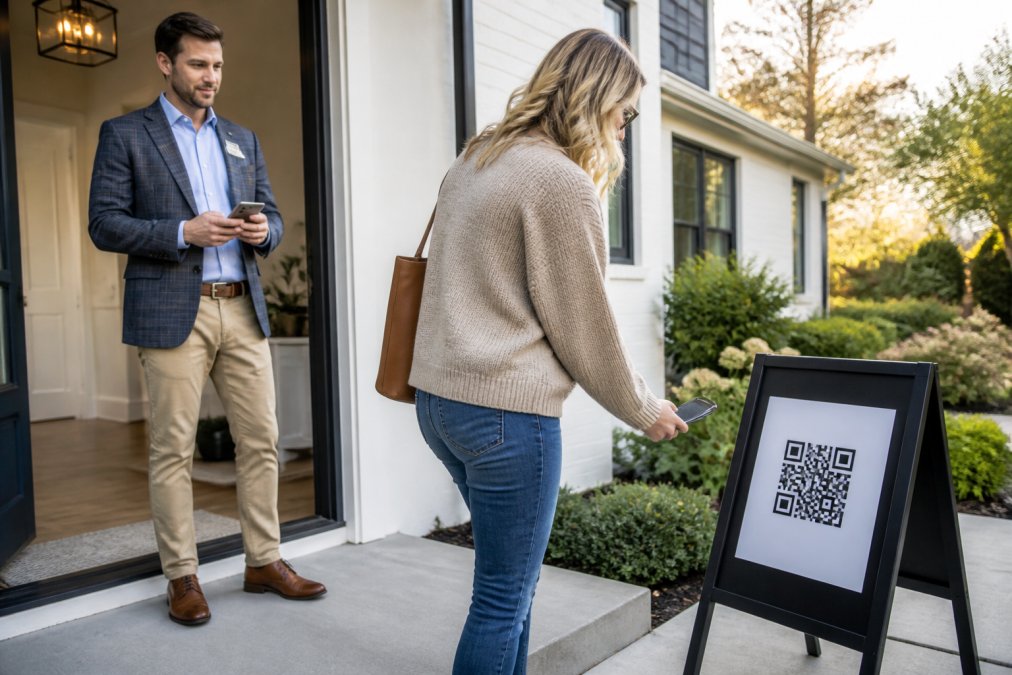
- Post a print-ready branded QR sign on a pedestal or a-frame outside the door
- Visitor scans and completes a short form on their own phone
- Two codewords arrive instantly, one by text and one by email
- Visitor tells a codeword to the host agent at the door
- Agent receives an instant text and email alert with the visitor's details
CRM Integration for Real Estate Leads: What Actually Works
"CRM integration" is the most overpromised phrase in real estate software.
The Three Delivery Methods That Move Sign-Ins Into Your CRM
- Formatted lead email. Every sign-in is sent to your CRM's lead-intake address, labeled so the CRM parses it into fields automatically.
CRM Compatibility Matrix: What the Dropdown Actually Covers
Here is the list ohACCESS ships with, plus what each path requires on your end.
| CRM | Delivery Path | What You Set Up |
|---|---|---|
| Follow Up Boss | Formatted lead email | Paste your lead-intake address |
| BoldTrail / kvCORE | Formatted lead email | Paste your lead-intake address |
| Lofty | Formatted lead email | Paste your lead-intake address |
| Sierra Interactive | Formatted lead email | Paste your lead-intake address |
| Real Geeks | Formatted lead email | Paste your lead-intake address |
| CINC | Formatted lead email | Paste your lead-intake address |
| Top Producer | Formatted lead email | Paste your lead-intake address |
| Wise Agent | Formatted lead email | Paste your lead-intake address |
| LionDesk | Formatted lead email | Paste your lead-intake address |
| Other | Formatted lead email or Zapier webhook | Lead-intake address, or build a Zap |
How to Test CRM Delivery Before You Commit
- Register one test sign-in using your own phone and email
- Confirm the lead appears in your CRM as a new contact, not a raw email in an inbox
- Check that name, phone, email, and buying timeline land in separate fields
- Verify the verification status is visible on the record
- Repeat with a second test sign-in to confirm it is not a one-time manual setup
What Lands in the Lead, Field by Field
A formatted lead email is only useful if the CRM can parse it.
Post-Capture Automation: Where the Lead Goes Next
Sign-in apps capture the lead; they do not run the follow-up sequence.
Privacy, Compliance, and Hardware: The Angles Most Comparisons Skip
Three questions separate serious buyers from tire kickers: what data is stored, who can see it, and what hardware it needs.
Hardware: What You Actually Need at the Door
What you do need:
- A printed QR sign on a pedestal or a-frame outside the door, or your permanent reusable per-agent QR code
- A charged phone on your end to receive the text and email alerts
- A cellular signal at the property, since sign-in uses the visitor's connection, not the home's Wi-Fi
Privacy: What the Seller Report Shows, and What It Deliberately Does Not
The ohACCESS seller report is aggregate-only.
Compliance: What CCPA and FTC Guidance Mean for a Sign-In App
- What is the retention period, and is it automatic? ohACCESS purges data automatically after 3 years. There is no configurable retention policy and no automated right-to-be-forgotten workflow, if a visitor asks you to delete their record, you handle that request through the vendor's support process, not a self-serve toggle.
- What is the legal basis for holding the data? ohACCESS ships with an attorney-reviewed Terms and Privacy Policy, so the consent language is already written for you.
- What happens when a visitor opts out of texts? STOP opt-outs are honored globally, and the visitor log flags them so you do not accidentally re-text someone who asked you to stop.
- What forensic trail exists if a lead turns out to be fake? Every sign-in carries IP, device, and phone carrier/line-type data, and the log flags VoIP and burner numbers, bounced emails, and undeliverable texts.
The Compliance Question Most Comparisons Never Ask
Ask any vendor where the data is stored, who can access it, and what happens to it when you cancel.
Best Practices for Open House Follow-Up After the Sign-In
Verification buys you one thing: a follow-up you can trust.
Conclusion: How to Choose Between Open House Sign-In Apps
Choose on verification first, delivery second, and price third.
Frequently Asked Questions
What is the best app for open house sign-in?
The best app depends on whether it verifies the contact info it collects. Most open house sign-in apps capture a name, email, and phone number, but anyone can type a fake number. ohACCESS sends two codewords, one by text and one by email, the moment a visitor submits the form. The visitor tells a codeword to the host agent at the door, which proves the phone and email are real and theirs. If verified leads matter more than a longer feature list, start there.
How does an open house sign-in app pricing comparison actually work?
Most apps price per agent per month, and some add charges based on how many open houses or visitors you run. ohACCESS uses flat published pricing: a free trial for the first 25 sign-ins, then $15/month for a solo agent, a flat $120/month for teams of 2 to 10 agents, and $11 per agent per month for brokerages of 11 to 100 agents. Price never changes with open house or visitor volume, so a busy weekend costs the same as a quiet one.
Do real estate open house apps require visitors to download software?
Some do, which kills registration rates at the door. ohACCESS requires no app download and no account. The visitor scans a QR code posted outside the home, fills out a short form on their own phone, and receives two codewords by text and email. The form is available in 16 languages, and returning visitors are remembered for a year, so their information is pre-filled on the next visit.
How can agents ensure visitor contact information is accurate during an open house?
Verification at the door is the only reliable method. With ohACCESS, the visitor receives a codeword by text and a second codeword by email immediately after submitting the form, then tells one to the host agent to enter. A fake phone number or mistyped email means no codeword arrives, and the visitor cannot get in. The agent also gets an instant text and email alert for every sign-in, plus flags for VoIP numbers and bounced emails.
Frequently asked questions
What is the best app for open house sign-in?
The best app depends on whether it verifies the contact info it collects. Most open house sign-in apps capture a name, email, and phone number, but anyone can type a fake number. ohACCESS sends two codewords, one by text and one by email, the moment a visitor submits the form. The visitor tells a codeword to the host agent at the door, which proves the phone and email are real and theirs. If verified leads matter more than a longer feature list, start there.
How does an open house sign-in app pricing comparison actually work?
Most apps price per agent per month, and some add charges based on how many open houses or visitors you run. ohACCESS uses flat published pricing: a free trial for the first 25 sign-ins, then $15/month for a solo agent, a flat $120/month for teams of 2 to 10 agents, and $11 per agent per month for brokerages of 11 to 100 agents. Price never changes with open house or visitor volume, so a busy weekend costs the same as a quiet one.
Do real estate open house apps require visitors to download software?
Some do, which kills registration rates at the door. ohACCESS requires no app download and no account. The visitor scans a QR code posted outside the home, fills out a short form on their own phone, and receives two codewords by text and email. The form is available in 16 languages, and returning visitors are remembered for a year, so their information is pre-filled on the next visit.
How can agents ensure visitor contact information is accurate during an open house?
Verification at the door is the only reliable method. With ohACCESS, the visitor receives a codeword by text and a second codeword by email immediately after submitting the form, then tells one to the host agent to enter. A fake phone number or mistyped email means no codeword arrives, and the visitor cannot get in. The agent also gets an instant text and email alert for every sign-in, plus flags for VoIP numbers and bounced emails.
Keep reading
Start free with 25 verified check-ins. No credit card required.
Start Free