QR Code Sign-In for Real Estate: Benefits Explained
Table of Contents
- Why QR Code Sign-In Replaces Paper at Open Houses
- How the Verification Flow Works: From Scan to Codeword
- Instant Lead Capture and Real-Time Notifications
- Best Digital Open House Sign-In Apps and How They Compare
- Real Estate Open House Sign-In Sheet Template: Digital vs. Paper
- How to Follow Up With Open House Leads Automatically
- Open House Lead Generation Strategies That Actually Work
- Privacy, Compliance, and Security for Digital Sign-Ins
- Frequently Asked Questions
Last Updated: September 21, 2026
Why QR Code Sign-In Replaces Paper at Open Houses
Paper sign-in sheets create three persistent problems: fake names and invalid contact information, slow manual data entry, and no proof of genuine buyer interest, challenges that QR code sign-in real estate solutions now solve. Digital alternatives solve all three.
Visitors write illegible entries or provide false details. Agents waste hours deciphering handwriting and chasing undeliverable leads. A QR code sign-in for real estate eliminates this by requiring visitors to enter their actual contact information on their own phones.
Manual data entry from paper sheets consumes time better spent on showings. Digital sign-in delivers every visitor's information instantly to the agent's inbox and CRM.
Homeowners want proof of genuine buyer interest. Paper sheets don't distinguish serious prospects from curious neighbors, but QR code sign-in real estate systems capture buying timeline and feedback to identify genuine interest. A QR code sign-in captures buying timeline and post-tour feedback, giving sellers concrete evidence.
ohACCESS replaces paper sign-in sheets with verified digital check-in. Visitors scan a QR code, fill out a short form with name, email, phone, and buying timeline, and instantly receive two codewords: one by text and one by email. They share a codeword with the agent at the door, proving their contact information is real. The agent gets an instant alert, and the seller sees an aggregate report showing visitor count, buying intent, and property feedback, with no individual visitor personal information exposed.
No app download, no account setup, no friction.
How the Verification Flow Works: From Scan to Codeword
Step 1: Visitor Scans the QR Code
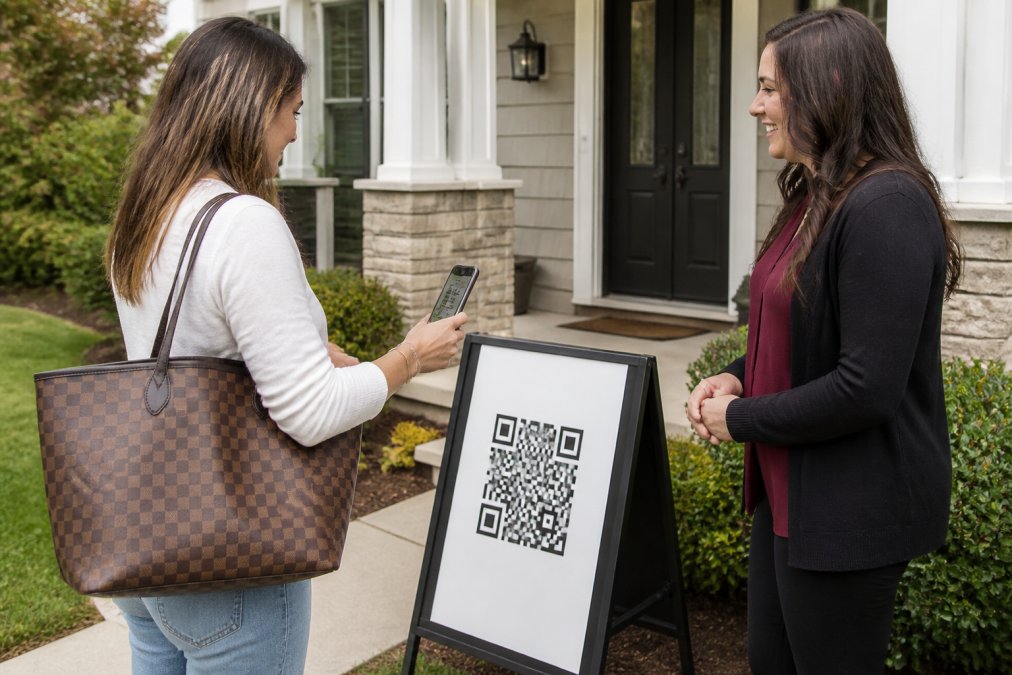
A printed QR code on an a-frame sign or pedestal outside the property is scanned with the visitor's phone camera. No app required. The QR code links to a web form that loads instantly.
Step 2: Visitor Fills Out the Registration Form
The form captures name, email, phone number, and buying timeline (0-3 / 3-6 / 6-12 / 12+ months). The agent can add one custom question. The form is available in 16 languages for international visitors.
Step 3: Instant Delivery of Two Codewords
The moment the visitor submits the form, ohACCESS sends two codewords immediately: one by text message and one by email. Visitors with international phone numbers receive their text codeword via WhatsApp. Both arrive within seconds.
Step 4: Visitor Shares a Codeword With the Agent
The visitor tells the agent one of their codewords at the door. The text codeword is primary; the email codeword is backup if the text is delayed. Nothing is typed into any system.
Step 5: Agent Receives Instant Alert
The agent receives a text and email alert with the visitor's details: name, phone, email, buying timeline, and custom question answers. The information lands in the agent's inbox and CRM immediately. Because visitors received codewords on their own phones using real contact information, the agent knows the phone number and email are genuine.
Instant Lead Capture and Real-Time Notifications
Paper sheets create a lag: agents collect information, then spend hours typing it into their CRM. Days pass before follow-up begins. A QR code sign-in for real estate compresses this to seconds. The moment a visitor completes registration, the agent receives a text and email notification with their details, buying timeline, and questions.
Agents can reach out while the property is fresh in the visitor's mind, prioritize by buying timeline, and answer specific questions. Lead data flows directly into the CRM automatically through formatted lead email or Zapier webhook, no manual entry, no transcription errors.
Best Digital Open House Sign-In Apps and How They Compare
Several tools exist for capturing open house leads digitally. They vary significantly in approach, features, and cost.
| Tool | Best For | Key Difference |
|---|---|---|
| ohACCESS | Verified lead capture with CRM integration | Two-codeword verification proves phone and email are real; agents don't manage codeword entry |
| Bitly | Tracking marketing material scans | Dynamic QR codes with analytics; no lead form or verification |
| ME-QR | Branded, visually customized QR codes | Design flexibility; no lead capture or CRM integration |
| SmartyTags | Virtual tour promotion | Links directly to property tours; limited lead management |
| The QR Code Generator | Affordable QR creation | Lowest cost; no real estate-specific features |
ohACCESS solves the fake-lead problem. Visitors prove their contact information is real by receiving codewords on their own phones. The agent never manually enters or manages codes. CRM integration is automatic through formatted lead email or Zapier. The free trial covers the first 25 sign-ins with all features included.
Bitly tracks marketing scans and shows geographic data, but doesn't capture lead information or integrate with CRM systems.
ME-QR offers visually branded QR codes but lacks lead capture forms and CRM integration.
SmartyTags links QR codes to property tours and neighborhood information, with lead capture secondary.
The QR Code Generator is affordable but has no real estate-specific features, lead capture, or CRM integration.
Real Estate Open House Sign-In Sheet Template: Digital vs. Paper
Paper sign-in sheets capture the same basic information, but the data quality and usability differ dramatically.
Paper sheets have columns for name, phone, email, and buying timeline. Handwriting varies from legible to illegible. Some visitors skip fields or enter false details. After the open house, agents spend time deciphering entries and typing them into their CRM. Bounced emails and illegible numbers waste follow-up attempts. Days pass before data is clean and entered.
A digital form captures the same information with built-in quality controls: valid email and phone formats, required or optional fields per agent preference. Most importantly, visitors receive codewords confirming their contact information is real, eliminating the majority of fake leads.
The digital form captures buying timeline, custom questions, and post-tour feedback. Sellers see an aggregate report showing visitor count, how many plan to buy within 6 months, and average property rating, with no individual names or contact information, only aggregate trends.
How to Follow Up With Open House Leads Automatically
Capturing leads is only valuable if follow-up happens quickly and consistently.
Manual follow-up is slow and unreliable. Agents collect dozens of leads, then prioritize from memory. Some get called immediately; others sit in a spreadsheet for days or weeks. Many leads go cold.
Automated follow-up solves this by triggering actions the moment a lead registers. Here's how the process works:
Step 1: Lead Data Arrives in CRM Automatically
ohACCESS delivers visitor information to the agent's CRM through formatted lead email or Zapier webhook, no manual data entry.
Step 2: CRM Triggers Automated Sequences
Most CRM systems allow agents to create automated workflows. When a new lead arrives, the CRM can send a thank-you email, schedule a follow-up call, or assign the lead based on buying timeline. ohACCESS does not offer built-in drip campaigns or automated follow-up sequences; the agent's CRM handles these functions with the leads ohACCESS delivers.
Step 3: Leads Are Prioritized by Buying Timeline
The digital form captures buying timeline. The CRM uses this to prioritize follow-up: 0-3 month buyers first, then 12+ month buyers into long-term nurture.
Step 4: Post-Tour Feedback Informs Follow-Up
ohACCESS collects a 1-10 property rating and price verdict (Too High / Reasonable / Too Low). Visitors rating 8-10 and thinking the price is reasonable are higher-priority follow-ups.
Step 5: Team Dashboards Track Follow-Up Progress
Instant lead delivery, CRM integration, and automated workflows ensure follow-up begins within hours, not days.
Open House Lead Generation Strategies That Actually Work
Lead generation at open houses depends on three factors: foot traffic, lead quality, and follow-up speed.
Maximize Foot Traffic
Promote through email, social media, and listing sites. Use QR codes on digital ads and social posts to drive traffic.
Capture High-Quality Leads
The digital form captures buying timeline, distinguishing curious neighbors from qualified prospects. Focus initial follow-up on 0-3 month buyers, closest to a purchase decision.
Verify Contact Information
A QR code sign-in that delivers codewords proves contact information is real. Valid phone and email formats are required, eliminating the majority of unusable leads.
Collect Property-Specific Feedback
Add a custom question to the sign-in form to guide follow-up conversations and address objections.
Follow Up Immediately
Send an automated thank-you email within minutes. Call 0-3 month buyers within hours while the property is fresh in their mind.
Share Proof With the Seller
Sellers want evidence that their property attracted serious interest. Generate a one-tap seller report showing visitor count, buying timeline breakdown, average property rating, and price verdict.
Track Results and Optimize
Privacy, Compliance, and Security for Digital Sign-Ins
Collecting visitor contact information creates compliance responsibilities. Agents must handle data securely and respect visitor privacy.
Data Collection Consent
Seller Privacy
Data Security
Opt-Out Compliance
International Visitors
Data Retention and Right to Delete
Frequently Asked Questions
Why should real estate agents use QR codes for open houses instead of paper sign-in sheets?
QR code sign-in eliminates illegible handwriting, fake names, and invalid contact information that plague paper sheets. Visitors fill out their own form on their phone, and their contact details are instantly verified when they receive codewords by text and email. This means every lead in your database is real and ready for immediate follow-up, no time wasted cleaning data or chasing dead phone numbers.
How does digital sign-in improve lead accuracy and quality?
Paper sheets capture whatever someone writes down; digital forms require real email addresses and phone numbers because visitors must receive codewords to enter the property. The system flags VoIP numbers, bounced emails, and undeliverable texts, so you know instantly which leads are solid. Your CRM receives only verified contact information, not guesses or throwaway numbers.
Can digital open house sign-in sheets integrate with my CRM system?
Yes. Digital sign-in systems deliver every visitor registration into your CRM automatically as a formatted lead email, or via Zapier webhook integration if you use a different platform. The leads arrive with name, email, phone, buying timeline, and any custom questions you added, ready to work immediately without manual data entry.
What information should I collect during an open house sign-in to qualify leads better?
Collect name, email, phone, and buying timeline (0-3 months, 3-6 months, 6-12 months, 12+ months). This timeline tells you who is ready to buy now versus who is just browsing. Many systems allow one custom question, use it to ask about financing status, property type preference, or any detail specific to your listing. Keep the form short so visitors complete it in under 30 seconds.
Frequently asked questions
Why should real estate agents use QR codes for open houses instead of paper sign-in sheets?
QR code sign-in eliminates illegible handwriting, fake names, and invalid contact information that plague paper sheets. Visitors fill out their own form on their phone, and their contact details are instantly verified when they receive codewords by text and email. This means every lead in your database is real and ready for immediate follow-up—no time wasted cleaning data or chasing dead phone numbers.
How does digital sign-in improve lead accuracy and quality?
Paper sheets capture whatever someone writes down; digital forms require real email addresses and phone numbers because visitors must receive codewords to enter the property. The system flags VoIP numbers, bounced emails, and undeliverable texts, so you know instantly which leads are solid. Your CRM receives only verified contact information, not guesses or throwaway numbers.
Can digital open house sign-in sheets integrate with my CRM system?
Yes. Digital sign-in systems deliver every visitor registration into your CRM automatically as a formatted lead email, or via Zapier webhook integration if you use a different platform. The leads arrive with name, email, phone, buying timeline, and any custom questions you added—ready to work immediately without manual data entry.
What information should I collect during an open house sign-in to qualify leads better?
Collect name, email, phone, and buying timeline (0–3 months, 3–6 months, 6–12 months, 12+ months). This timeline tells you who is ready to buy now versus who is just browsing. Many systems allow one custom question—use it to ask about financing status, property type preference, or any detail specific to your listing. Keep the form short so visitors complete it in under 30 seconds.
Keep reading
Start free with 25 verified check-ins. No credit card required.
Start Free